Which maintenance app for android fits field crews?
Field crew workflow and app needs
Field crews in industrial settings often juggle multiple tasks at once, from responding to urgent breakdowns to completing scheduled checks on critical equipment. A reliable maintenance app for android gives teams a single place to receive assignments, update progress, and log findings without relying on paper forms or disconnected spreadsheets. Operations leaders look for tools that handle work order creation, live scheduling changes, and detailed maintenance reporting while fitting into existing plant procedures.
The right choice depends on how crews actually move through their day. Some apps prioritize recurring schedules, others focus on asset histories, and still others emphasize quick photo and note capture for compliance. Understanding these differences helps supervisors avoid tools that add friction instead of removing it. This comparison examines practical workflow impacts across common approaches so teams can match an application to their specific mix of preventive work, reactive jobs, and asset tracking needs.
Comparison Table
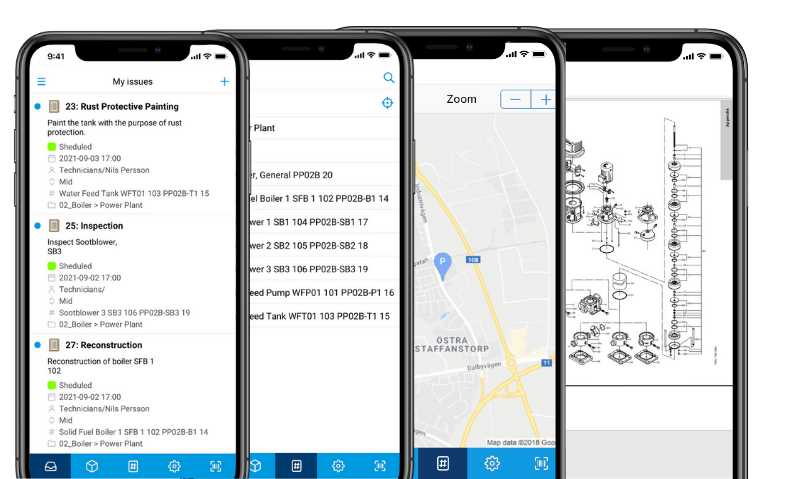
Selecting a maintenance app for android starts with matching core capabilities to daily crew routines. The table below breaks down five common categories against the functions that matter most on the floor.
| App capability category | Scheduling and recurring tasks | Work order progress in the field | Maintenance reporting fields | Asset register coverage | Integration fit with EAM/ERP | Offline handling | Best fit scenario |
|---|---|---|---|---|---|---|---|
| maintenance schedule app (recurring) | Strong calendar and trigger rules for preventive work; limited ad-hoc job creation. | Simple status updates only; little room for notes or photos during execution. | Basic completion checkboxes; minimal custom fields. | Light asset lists tied to schedules rather than full histories. | Exports to basic systems; deeper ERP links often require add-ons. | Works offline for viewing schedules but requires sync for changes. | Plants with stable preventive calendars and few emergency calls. |
| maintenance job application (assignment + approvals) | Flexible assignment and re-routing; recurring jobs possible but secondary. | Real-time progress, approvals, and technician hand-offs supported. | Structured fields plus free-text notes; photo support varies. | Asset lookup available but editing rights often limited to supervisors. | Good two-way sync with many EAM platforms via APIs. | Strong offline mode for completing and queuing jobs. | Teams that receive work from planners and need quick field approvals. |
| industrial maintenance app (standards + checklists) | Recurring tasks tied to standards and compliance calendars. | Step-by-step guided procedures with required fields before sign-off. | Rich checklist support plus measurement capture and conditional logic. | Asset data includes specifications and last inspection results. | Connects well to quality and safety modules in larger systems. | Offline checklist completion with later sync. | Regulated environments needing documented procedures every shift. |
| mobile enterprise asset management (asset-centric) | Schedules generated from asset criticality and failure data. | Full work history visible on the asset record during the job. | Asset-focused reporting with readings and parts usage. | Deep register with hierarchies, warranties, and spare parts links. | Native fit with enterprise asset platforms; lighter ERP ties. | Full asset data cached for offline reference and edits. | Facilities where asset reliability data drives most decisions. |
| maintenance reporting app (photos, notes, compliance) | Basic scheduling; reporting takes priority over automation. | Rich capture of conditions, photos, and voice notes at job site. | Highly flexible forms with attachments and digital signatures. | Asset tagging for reports but limited historical depth. | Strong export options; live integration often needs middleware. | Excellent offline capture with large media files queued. | Inspection-heavy operations that need detailed compliance records fast. |
Each row shows what changes for a plant maintenance mobile application user. For example, a schedule-first tool may force crews to wait for planner updates before starting an urgent repair, while an asset-centric approach lets technicians pull the full history on the spot. A reporting-focused maintenance app for android can slow simple jobs because every field must be completed before close-out. Understanding these trade-offs prevents choosing an app that solves one problem while creating delays in another part of the workflow.
Evaluating a maintenance app for android in practice
Real plants test these categories by running the same work order through each approach. A pump seal replacement might take three steps in a job application but require eight checklist items in an industrial standards tool. The difference shows up quickly in time spent per job and in how many follow-up questions come back from quality or safety teams.
The Good and the Bad
| Approach | Advantages | Disadvantages |
|---|---|---|
| Schedule-first | Predictable workload, fewer missed preventive tasks, easy for planners to manage. | Less flexibility when breakdowns occur, crews wait for new assignments, limited field context. |
| Asset-first | Rich history at the point of work, better spare parts decisions, supports reliability programs. | Higher data maintenance load, slower for simple jobs, requires accurate asset hierarchy upfront. |
| Reporting-first | Excellent compliance records, fast capture of findings, works well for inspections. | Data entry burden on every job, risk of incomplete work orders, weaker scheduling automation. |
Many teams discover that a pure schedule-first tool leaves little room for the unexpected jobs that dominate a typical shift. Asset-first solutions shine when failure data drives decisions yet can overwhelm crews who simply need to close a work order quickly. Reporting-first apps deliver the documentation auditors want but often push technicians to spend extra minutes on each task. A balanced maintenance app for android usually combines elements from two categories rather than forcing one extreme. this write-up documents how this works in a real deployment. The follow-up piece From maintenance reporting to reliability: the data fields your… covers this in more practical detail. This pairs well with When Maximo on mobile beats mobile app maintenance, which works through concrete examples.
Trade-offs also appear in training time. Schedule tools need the least instruction because the calendar view feels familiar. Asset and reporting tools require more setup so crews understand which fields matter for downstream analytics. Organizations that skip this step see lower adoption and incomplete records within weeks of rollout.
Making the Decision
Crews that receive most work through planners benefit from a maintenance job application with strong assignment and offline features. Teams focused on asset reliability gain more from mobile enterprise asset management that surfaces history and parts data. Inspection-driven operations usually prefer the flexible forms found in a maintenance reporting app. The deciding factor is which workflow step currently creates the biggest delay or compliance risk.
Request a workflow checklist that maps your current job types, required data points, and integration points. The checklist helps compare shortlisted tools against actual shift patterns instead of feature lists alone. Vardian supports this evaluation by connecting scheduling, reporting, and asset data in one mobile experience that works for both planned and reactive work.
Frequently Asked Questions
How does a maintenance app for android handle sudden priority changes during a shift?
Most modern tools allow supervisors to reassign or escalate jobs from a central dashboard. The updated assignment reaches the technician’s device within seconds when connectivity exists. Offline queues hold the change until the next sync. This keeps crews moving without returning to a central office for new paper tickets.
What level of training do field crews typically need?
Basic navigation and status updates take under an hour for most users. More complex checklist or asset forms require two to four hours spread across the first week. Ongoing coaching focuses on why certain fields matter rather than button locations. Plants that invest in short daily huddles see faster consistent use.
Can these apps replace an existing EAM system?
They usually act as the mobile front end rather than a full replacement. Data flows back to the EAM or ERP through APIs so planners keep their current scheduling and costing views. The mobile layer improves data quality from the field without forcing a rip-and-replace project.
How important is offline capability for remote sites?
Very important when crews work in areas with weak signals. Good offline modes store asset records, checklists, and work orders locally. Photos and readings queue for upload once connectivity returns. Teams that test offline performance during pilot projects avoid surprises on go-live day.
Which reporting features matter most for audits?
Time-stamped entries, required fields before close-out, and attached photos or documents rank highest. Digital signatures and automatic version history also help during reviews. A maintenance app for android that enforces these rules at the point of work reduces the chance of missing documentation later.
According to the Wikipedia entry on computerized maintenance management systems, organizations that capture structured field data see measurable improvements in equipment uptime over time. this write-up shows similar patterns when crews move from paper to guided digital workflows.
Related subtopics
- facility management app
- maintenance application
- paper based maintenance system
- mobile enterprise asset management
- maintenance reporting app
Further Reading
- Maintenance job application workflows: from checklists to closed work orders on mobile
- Odoo maintenance app vs Odoo repair app: what changes for work orders and mobile evidence
- Set up a mobile maintenance workflow in 7 steps for Android crews
- What should a salesforce maintenance schedule cover for recurring jobs and handoffs?
- Mining, food processing, and school maintenance: choosing a maintenance system by constraints
{“@type”:”FAQPage”,”@context”:”https://schema.org”,”mainEntity”:[{“name”:”How does a maintenance app for android handle sudden priority changes during a shift?”,”@type”:”Question”,”acceptedAnswer”:{“text”:”Most modern tools allow supervisors to reassign or escalate jobs from a central dashboard. The updated assignment reaches the technician’s device within seconds when connectivity exists. Offline queues hold the change until the next sync. This keeps crews moving without returning to a central office for new paper tickets.”,”@type”:”Answer”}},{“name”:”What level of training do field crews typically need?”,”@type”:”Question”,”acceptedAnswer”:{“text”:”Basic navigation and status updates take under an hour for most users. More complex checklist or asset forms require two to four hours spread across the first week. Ongoing coaching focuses on why certain fields matter rather than button locations. Plants that invest in short daily huddles see faster consistent use.”,”@type”:”Answer”}},{“name”:”Can these apps replace an existing EAM system?”,”@type”:”Question”,”acceptedAnswer”:{“text”:”They usually act as the mobile front end rather than a full replacement. Data flows back to the EAM or ERP through APIs so planners keep their current scheduling and costing views. The mobile layer improves data quality from the field without forcing a rip-and-replace project.”,”@type”:”Answer”}},{“name”:”How important is offline capability for remote sites?”,”@type”:”Question”,”acceptedAnswer”:{“text”:”Very important when crews work in areas with weak signals. Good offline modes store asset records, checklists, and work orders locally. Photos and readings queue for upload once connectivity returns. Teams that test offline performance during pilot projects avoid surprises on go-live day.”,”@type”:”Answer”}},{“name”:”Which reporting features matter most for audits?”,”@type”:”Question”,”acceptedAnswer”:{“text”:”Time-stamped entries, required fields before close-out, and attached photos or documents rank highest. Digital signatures and automatic version history also help during reviews. A maintenance app for android that enforces these rules at the point of work reduces the chance of missing documentation later.”,”@type”:”Answer”}}]}