Facility management app choices: what to verify before rollout
Comparing facility management app capabilities
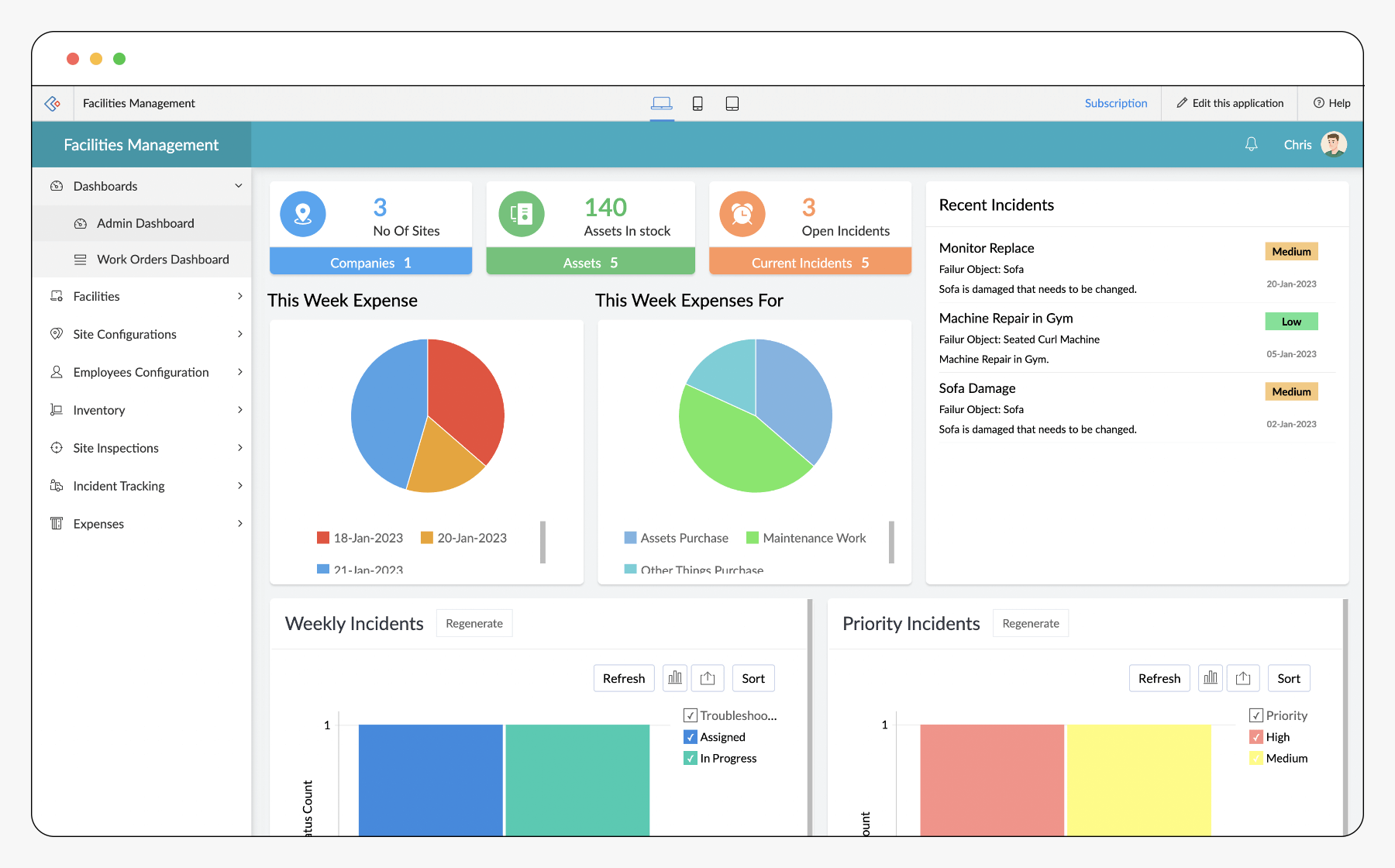
Operations teams often reach the point where paper logs and scattered spreadsheets no longer keep up with daily demands. Requests arrive for a facility management app. It handles work orders and tracks assets in real time. The app supports mobile crews and produces audit-ready records across multiple buildings. Leaders begin comparing options. The cost of a failed rollout shows up quickly in missed inspections, delayed repairs, and compliance gaps.
The right choice of a facility management app connects frontline workers with equipment data, preventive schedules, and vendor requests without forcing extra manual steps. This comparison focuses on the specific capabilities that separate workable tools from those that create new bottlenecks during building maintenance and equipment management.
For example, a facilities manager at a mid-sized office park recently described how switching from paper to a facility maintenance app cut response times for HVAC complaints from three days to under four hours after technicians began using mobile work orders.
A facility management app must address both immediate ticket handling and longer-term asset history. Teams need offline mobile updates when network coverage drops inside mechanical rooms or rooftops. They also require clear permission controls. Technicians see only the tasks assigned to their site. Managers view cross-location trends. The sections below break down four common software approaches against ten practical criteria. Procurement leads can match requirements to real system behaviors. Consider involving technicians early in demos to gather feedback on mobile usability. Their daily routines determine whether adoption succeeds or stalls.
Practical tip: Start by auditing your current pain points, such as how often preventive maintenance gets skipped due to forgotten calendar reminders. Many teams discover that a facilities management system software pays for itself within the first year by preventing one major equipment failure through better scheduling. Compliance-heavy facilities can borrow from Vardian’s 21 CFR Part 11 guide when audit trails become a hard requirement. A closely related walkthrough, erp fleet maintenance software vs ERP for mixed vehicles, picks up where this section ends. The follow-up piece Maximo maintenance software: preventive, predictive, or both? covers this in more practical detail. A closely related walkthrough, Recover maintenance history from paper logs to cmms programs, picks up where this section ends. This pairs well with Which CMMS Fits Your Hotel Maintenance App?, which works through concrete examples. For the adjacent problem, From Submit Button to Dispatch: Implementing an Online Maintenance… goes deeper into the specifics. For the adjacent problem, When CMMS Workflows Break: Building a Maintenance Request System That… goes deeper into the specifics.
Comparison
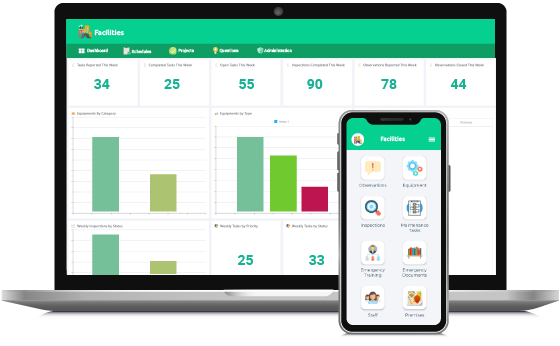
Four software categories appear most often during evaluations. Spreadsheet-first asset tracking relies on shared files with basic formulas. Work-order focused building maintenance application centers on ticket creation and closure. Facilities management applications with recurring schedules add automated task generation. Full equipment management application with integrations pulls in data from accounting, sensors, and existing CMMS platforms. The table below shows how each category performs on criteria that matter for multi-site operations. When evaluating, map these categories against your portfolio size. A single-site retail store might stay with lighter options. A university campus with dozens of buildings benefits from deeper hierarchy features found in a facility management app.
| Criterion | Spreadsheet-first asset tracking | Work-order focused building maintenance application | Facilities management applications with recurring schedules | Full equipment management application with integrations |
|---|---|---|---|---|
| Work orders and preventive schedules | Manual entry only, no automation | Strong ticket flow, limited recurring rules | Automated recurring tasks and alerts | Full workflow engine plus sensor triggers |
| Asset/equipment hierarchy | Flat list or simple folders | Basic parent-child links | Multi-level hierarchy with templates | Deep hierarchy and spare parts tracking |
| Mobile field updates (offline option) | None or file sync issues | App available, offline limited | Offline forms with sync on return | Full offline capability and photo capture |
| Vendor/service request handling | Email or separate spreadsheet | Basic request forms | Portal for vendors with status updates | Integrated vendor portal and contracts |
| Compliance logs and attachments | Files stored separately | Attachments per ticket | Logs tied to assets and schedules | Versioned records with e-signature support |
| User roles and permissions | Shared file access only | Role-based ticket views | Site-level and role-level controls | Granular permissions across modules |
| Reporting for trends and SLA | Manual charts | Basic ticket reports | Scheduled reports and dashboards | Custom analytics and SLA breach alerts |
| Integrations (accounting/CMMS exports) | CSV export | Limited API or file export | Standard connectors to finance systems | Native connectors and open APIs |
| Implementation effort and training | Low initial effort, high ongoing | Moderate setup and training | Higher setup, guided onboarding | Longer rollout, dedicated support |
| Cost model by site/asset count | Per user or free | Per technician or per ticket | Per building or per asset tier | Per site plus module fees |
Spreadsheet-first asset tracking
Teams start here because the files already exist and cost nothing extra. Updates happen through shared drives, yet version conflicts appear the moment two people edit the same row. Preventive tasks stay on separate calendars. Missed inspections become common once headcount changes. Asset history lives in comment fields that grow unwieldy after a few dozen entries. Mobile crews must return to a computer to log completed work. This delays data and increases transcription errors. This approach works only for single buildings with very low ticket volume. One facilities director shared an anecdote about losing an entire weekend reconciling conflicting spreadsheet versions after a storm event generated dozens of emergency tickets. Practical tip: If you remain on spreadsheets temporarily, enforce strict naming conventions and weekly backup reviews to limit damage until a proper facility maintenance app is selected.
Work-order focused building maintenance application
These tools improve ticket visibility and closure speed. Technicians receive assignments on phones and can attach photos before marking tasks complete. However, recurring schedules still require manual duplication each month. Quarterly filter changes or annual fire-pump tests often slip. Asset hierarchies stop at one or two levels. It is hard to track sub-components such as motor bearings within a rooftop unit. Reporting shows open versus closed counts but rarely surfaces trends in mean time between failures. The gap appears during audits when compliance officers ask for proof that preventive work happened on schedule across every site. In practice, a school district using this level of building maintenance application found that summer maintenance checklists were routinely overlooked because the system did not auto-generate them from prior year templates. A facility management app at this level still requires extra manual effort for recurring tasks.
Facilities management applications with recurring schedules
Automation of recurring tasks removes the manual calendar work that causes missed inspections. Templates carry the correct steps, required parts, and safety notes so every technician follows the same process. Mobile forms support offline completion, and records sync once coverage returns. Permission settings let site supervisors approve work while corporate teams view portfolio-wide compliance metrics. The limitation surfaces when deeper integrations are needed. Pulling runtime hours from a building automation system can trigger tasks automatically. Cost scales with building count rather than per ticket. This suits organizations that already run structured maintenance programs with a facility management app. A hospital facilities team reported that after adopting this category of facilities management system software, their Joint Commission audit preparation time dropped from weeks to a few clicks because every inspection log was already linked to the correct asset record.
Pros and Cons
| Software type | Advantages | Disadvantages |
|---|---|---|
| Spreadsheet-first asset tracking | No new software cost, familiar interface | Version conflicts, no automation, weak history, high manual effort |
| Work-order focused building maintenance application | Fast ticket handling, mobile access, simple reporting | Recurring tasks still manual, shallow asset data, limited compliance detail |
| Facilities management applications with recurring schedules | Automated schedules, offline mobile, clear permissions, audit logs | Higher setup time, fewer native integrations than full platforms |
| Full equipment management application with integrations | Deep hierarchy, sensor triggers, strong analytics, vendor portals | Longer implementation, higher cost, steeper training curve |
During actual building maintenance the gaps become visible quickly. Missed filter changes lead to higher energy use. Incomplete asset history forces technicians to re-inspect equipment they serviced last quarter. Limited reporting hides rising SLA breaches until complaints arrive from tenants. Organizations that choose the third or fourth category usually close these gaps once the initial configuration is complete. One facilities manager noted that moving to an equipment management application allowed predictive alerts on chiller performance, avoiding a $40,000 compressor replacement. The transition also improved vendor coordination because work orders now flowed directly into contractor portals with attached service histories.
One middle paragraph here references compliance needs that appear in regulated industries. See vardian.io for more context on electronic record requirements that affect how logs and attachments must be stored and retrieved. In healthcare or pharmaceutical settings, for instance, audit trails must prove exactly who performed each task and when. Basic work-order apps often cannot guarantee this without extra manual steps.
Testing apps with asset and inspections
Use the ten criteria in the comparison table to create a shortlist that matches your building count, mobile requirements, and integration needs. Test each shortlisted facility management app against a real asset issue, such as an overheating chiller, and a recurring inspection, such as quarterly fire-door checks. Request vendor demonstrations that include offline mobile entry and automated schedule generation so the gaps become obvious before contracts are signed. This approach reduces the chance that a new system simply replaces paper with digital frustration. Ask vendors how their equipment management application handles spare-parts inventory tracking and whether training includes role-specific sessions for both technicians and administrators. Many successful rollouts include a 90-day pilot at one site before expanding portfolio-wide.
Key Questions for Vendor Demos
Before signing, prepare targeted questions such as: How does the system handle network outages in basements or parking garages? Can we import existing asset data without losing hierarchy relationships? What happens to open work orders during an upgrade? These conversations often reveal whether the facility maintenance app will truly support daily operations or create new friction points.
- Hotel maintenance app requirements for guest-impact repairs
- Free facility maintenance software: what “free” usually covers and what it costs later
- Set up a building maintenance app for recurring inspections and work orders
- What should a salesforce maintenance schedule cover for recurring jobs and handoffs?
- Mining, food processing, and school maintenance: choosing a maintenance system by constraints