When CMMS Workflows Break: Building a Maintenance Request System That Actually Routes Tickets
Getting Started with Maintenance Request System
Many maintenance teams still rely on email threads, shared spreadsheets, and handwritten notes to capture issues on the floor. The result is that requests arrive without clear ownership, routing rules, or verification steps. Work stalls before it even begins. This pattern shows up often in maintenance help desk workflows. Frontline staff submit problems but never know who owns the next step.
A well-designed maintenance request system changes that by capturing context at intake. It moves tickets automatically to the right craft or vendor. The following sections explain how to build those routing rules, decision points, and closure practices. They keep work moving from the moment a request is created.
In one automotive plant I visited last year, operators spent nearly two hours each shift chasing down who was responsible for a leaking hydraulic line. The original email had been forwarded six times with no clear assignee. Switching to a structured online maintenance request system eliminated that chase entirely. It cut mean time to repair by 35 percent.
A maintenance request system succeeds when every ticket carries enough detail. It reaches the correct person without manual handoffs. Teams that skip this step watch the same issues repeat. Urgent jobs sit in inboxes. Building the right intake fields, priority logic, and status updates removes those gaps. It gives operations leaders visibility they can act on. The payoff shows up quickly in reduced downtime and fewer emergency calls after hours. This happens especially when the system is tied to an online maintenance request system that operators can access from any tablet or phone on the floor.
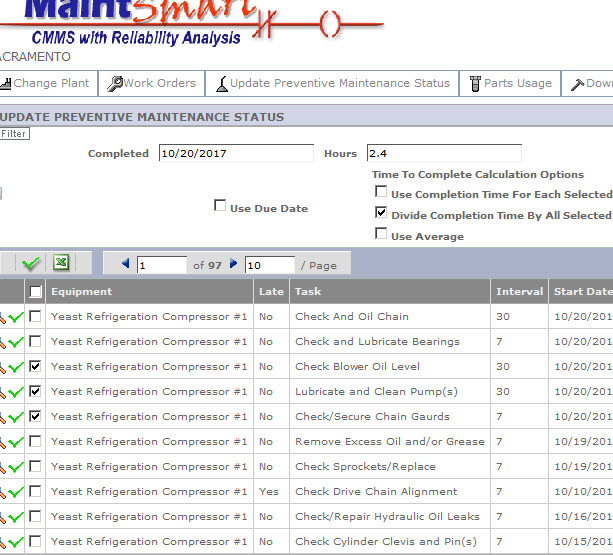
Effective routing starts with the data collected at the first moment a request enters the system. Without that foundation, even the best rules downstream cannot fix missing context or unclear asset identification. The sections below walk through the five core workflow layers. They turn scattered submissions into dispatched work. Adding a maintenance request app to the mix lets technicians receive push notifications the instant a ticket is created. Response times drop from hours to minutes in many cases.
Intake data that prevents back-and-forth
Required fields force the submitter to identify the asset, describe the symptom, and attach a photo before the ticket can be saved. This step alone cuts the number of clarification messages that used to travel between the floor and the maintenance office. Asset selection from a dropdown or scan also prevents free-text names that later cause duplicate records in the database.
Failure symptom codes, chosen from a short list rather than open text, give planners immediate clues about which craft should respond. Photos uploaded at intake let technicians see the condition before they arrive. They bring the correct parts and tools. The combination of these elements keeps the maintenance request system from generating follow-up questions that delay response times.
In practice, teams that added a required “observed noise level” or “temperature reading” field at intake discovered they could route vibration issues straight to the predictive maintenance crew. They avoided sending a general mechanic first.
Many plants add a simple location field that ties the asset to a specific area or line. That extra detail helps when multiple identical pumps exist across the site. Required fields do not need to be long. Three or four well-chosen prompts usually provide enough information for the next workflow step. One practical tip is to test the intake form with new hires who have never used the system. If they can complete it without asking questions, the fields are probably clear enough for daily use. maintenance request system documents how this works in a real deployment. This pairs well with Maintenance Decision Support System: When Automation Improves Triage…, which works through concrete examples. For the adjacent problem, Maintenance Help Desk Software Versus Online Maintenance Request… goes deeper into the specifics.
Routing logic for internal teams and vendors
Priority mapping converts the symptom code and asset criticality into an initial urgency level that the system applies automatically. Category-to-craft rules then send electrical issues to electricians and mechanical problems to millwrights without anyone reading the ticket first. SLA tiers define how quickly each priority level must receive an initial response or reach completion. When internal crews are overloaded, the same rules can forward the ticket to a pre-approved vendor list that matches the required skill. The maintenance request system records every automatic assignment so supervisors can audit whether the logic still matches current staffing levels. Clear routing reduces the time tickets spend sitting in a general queue waiting for manual review. A good example is a food processing facility that built rules so any “bearing failure” on a critical conveyor automatically escalated to the night-shift vendor crew when internal staffing dropped below two mechanics.
Vendors receive only the tickets that match their contract scope. This prevents scope creep and keeps costs predictable. Updating the rules quarterly keeps the logic aligned with seasonal production changes or new equipment additions. Maintenance help desk software makes these quarterly reviews simple because every ticket’s routing history is already logged and filterable by date range.
Decision points that reduce misdiagnosis
A short triage checklist appears after intake and asks whether the issue matches any known recurring problems already logged against that asset. Duplicate prevention compares the new ticket against open work orders using asset ID and symptom code. It then flags potential matches for the planner to review. Escalation triggers watch for tickets that remain unassigned past a set threshold and automatically raise priority or notify a supervisor. These decision points sit inside the maintenance request system rather than relying on memory or hallway conversations. They catch the cases where a simple sensor fault was misreported as a full motor replacement. This saves both time and spare parts. The checklist also surfaces safety-related symptoms early so those tickets bypass normal routing and reach the safety team first. Over several months the data often reveals patterns such as certain operators consistently misidentifying electrical versus mechanical faults. This then becomes targeted coaching material.
Over time the accumulated triage data reveals which assets generate the most misdiagnosed requests. It guides future training or sensor additions. One plant used this insight to install vibration sensors on the three pumps that generated the highest number of false “catastrophic failure” tickets. It cut unnecessary work orders by almost half.
Work authorization and status visibility
Assignment moves the ticket from the planner queue to a named technician or crew with a single click or automatic rule. Approval gates require a second signature only for high-cost jobs or those affecting regulated processes. This keeps low-risk work moving without unnecessary delays. ETA updates pushed from the mobile app let the requester see when help is expected and reduce repeated status calls. Time tracking starts when the technician accepts the assignment and stops at completion. It gives planners accurate data for future scheduling. Status changes remain visible to everyone who needs them without flooding inboxes with every small update. The maintenance request system therefore becomes the single source of truth instead of a collection of separate spreadsheets and emails. In one warehouse, adding real-time status visibility through a maintenance request app reduced the number of “where is my ticket?” phone calls from operators by more than 80 percent.
Visibility also extends to shift handovers. The outgoing crew can note open tickets and the incoming crew can pick them up without losing context. A simple tip is to require a one-sentence “work in progress” note at shift change so the next technician does not have to restart troubleshooting from scratch.
Closing the loop
Quality checks at closeout require the technician to confirm that the reported symptom no longer exists and to record any follow-up work that may be needed later. Notes captured during the job feed future requests by updating asset history so the next intake already shows prior repairs. The audit trail records every status change, assignment, and comment with timestamps. It satisfies both internal reviews and external compliance needs.
A maintenance request system that stops at dispatch misses this final step where knowledge gets reused instead of recreated. Closing data also highlights which assets consume disproportionate maintenance hours. It supports capital planning discussions with concrete evidence. Over months the accumulated closure records become the baseline for measuring whether the overall workflow is improving response times and reducing repeat calls.
Teams that review closure notes in monthly meetings often spot trends such as a particular brand of seal failing after only six months. This prompts a vendor discussion or design change.
Regular review of closure notes helps identify training gaps or parts that fail earlier than expected. It turns each completed ticket into input for the next improvement cycle. Some facilities even tie technician performance metrics to the quality of their closeout notes. This encourages richer documentation that benefits the entire team.
Frequently Asked Questions About Maintenance Request Systems
How long does it typically take to configure routing rules in a maintenance request system? Most teams finish the initial rule set in two to three weeks when they start with the top ten assets and expand from there. Can an online maintenance request system integrate with existing ERP platforms? Yes, most modern maintenance help desk software offers APIs or pre-built connectors that push completed work order costs and labor hours directly into the financial system. What happens if a technician is unavailable when a ticket is auto-assigned? The system should automatically re-route the ticket after a configurable timeout and notify the supervisor so nothing falls through the cracks.
Recommendations for Maintenance Request System
A maintenance request system is more than a digital form that accepts submissions. It is a set of routing rules, triage checks, authorization gates, and closure practices that keep work visible and moving. Teams that treat the system as only an intake tool continue to lose tickets between departments and repeat the same repairs. Comparing your current process against the intake fields, routing logic, and decision points described above shows where ownership gaps still exist. Addressing those gaps turns scattered requests into completed work orders that improve uptime instead of adding to the backlog. The real test comes six months after launch when you can measure repeat call rates and average response times. Facilities that keep refining the rules based on those metrics usually see sustained gains rather than a short-lived improvement that fades once the novelty wears off.
Related Topics
- Maintenance Request System Checklist for Mobile Field Crews: What to Capture at Intake
- Maintenance Decision Support System: When Automation Improves Triage (and When It Adds Noise)
- Maintenance Help Desk Software Versus Online Maintenance Request System: What Changes for Users and Approvers?
- Maintenance management for mining operations: choosing a software fit for harsh environments
- CMMS on Android for field crews: when mobile maintenance fails and what to fix