Set up a fleet vehicle maintenance app that actually captures service history
Capturing usable service history

When you Set up a fleet vehicle maintenance app that actually captures service history. The difference shows up in every audit and warranty claim. Many tools record that a truck visited the shop yet leave no usable details about what work occurred. The result is scattered notes, missing odometer readings, and incomplete records that create headaches during resale or compliance checks. This workflow focuses on the exact configuration steps that turn raw entries into reliable service history. Fleet managers and maintenance supervisors who follow it end up with data. This data supports preventive schedules, parts tracking, and clean exports. The approach works whether the platform is a paid solution. It also works with a truck fleet management software free download.
A fleet vehicle maintenance app becomes valuable only when every job produces consistent information. Searchable records let anyone on the team trust the data months later.

Define maintenance record categories (PM, inspections, repairs, tires, fluids)
Start by listing every type of work that will ever be logged. Create separate categories for preventive maintenance, safety inspections, corrective repairs, tire services, and fluid changes. Each category receives its own set of default fields so drivers and technicians know exactly what information belongs in that record. When you Set up a fleet vehicle maintenance app with clear categories, later searches and reports become reliable. Most fleets discover that six to eight main categories cover 95 percent of daily activity. Adding a notes field inside every category lets teams capture unusual findings without forcing the data into the wrong bucket. The goal is to make entry fast while still producing data that can be filtered by category during future reviews.
Set required fields for each category (odometer, work order notes, parts used, technician/driver)
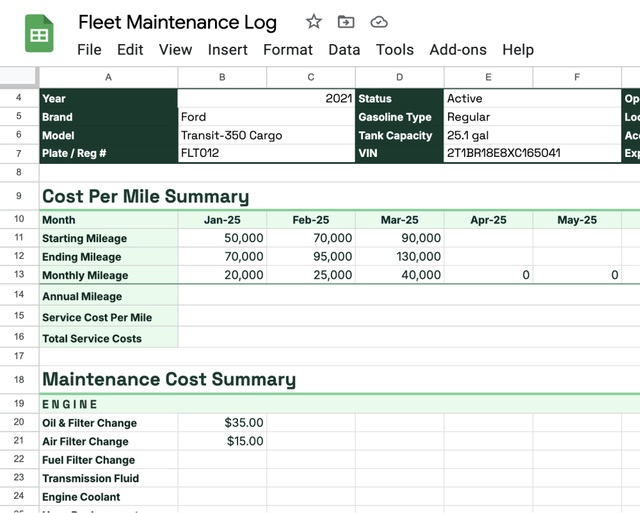
Once categories exist, decide which fields must be completed before a record can be saved. Odometer reading at the time of service, technician or driver name, parts used, and a brief work order note are the minimum for most fleets. Required fields prevent incomplete entries that later become useless for warranty or resale questions. When you Set up a fleet vehicle maintenance app this way, the system itself enforces data quality instead of relying on memory. Consider making odometer mandatory on every category while leaving certain part fields optional for inspection-only visits. Test the form on a tablet to confirm the layout stays usable in bright sunlight or cold weather. Required fields that match real workflow reduce the chance that someone will skip the record entirely.
Configure preventive schedules and triggers (time/mileage/engine hours)
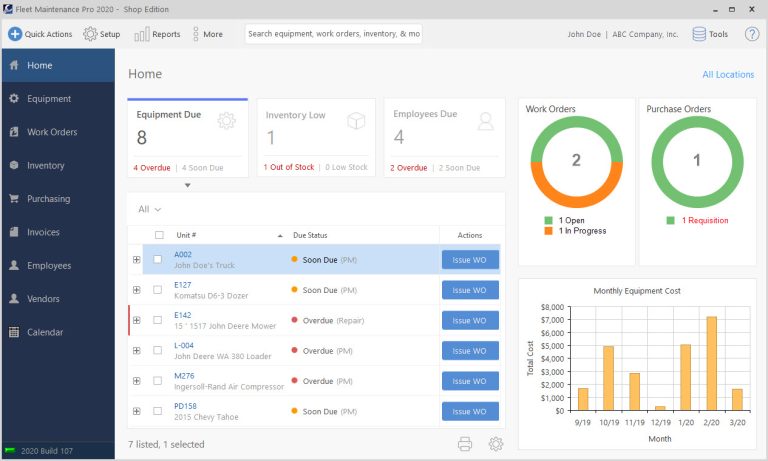
Preventive work keeps vehicles on the road and out of emergency repairs. Set triggers based on calendar days, odometer miles, or engine hours depending on how each asset is used. A delivery van might trigger every 5,000 miles while a yard truck triggers on engine hours. When you Set up a fleet vehicle maintenance app with accurate triggers, the system can generate upcoming work orders automatically. Link each trigger to the correct maintenance category so the generated order already carries the right fields. Review trigger values with experienced technicians before finalizing them. Adjust the first few schedules after real-world use shows whether intervals are too aggressive or too relaxed. For the adjacent problem, What app maintenance costs actually include for commercial software… goes deeper into the specifics. For the adjacent problem, When CMMS Workflows Break: Building a Maintenance Request System That… goes deeper into the specifics.
Assign roles and access rules for drivers, mechanics, and fleet managers
Role-based access keeps the right people from seeing or changing data they do not need. Drivers usually receive permission only to start inspections and add basic notes. Mechanics need full access to work orders and parts. Fleet managers require reporting and approval rights. When you Set up a fleet vehicle maintenance app with clear roles, audit trails remain trustworthy. Test each role on a sample vehicle to confirm no one can bypass required fields. Update role definitions whenever job responsibilities change so the system continues to reflect actual operations.
Set up vehicle and asset hierarchy (fleet asset management software approach: vehicle → subsystem → component)
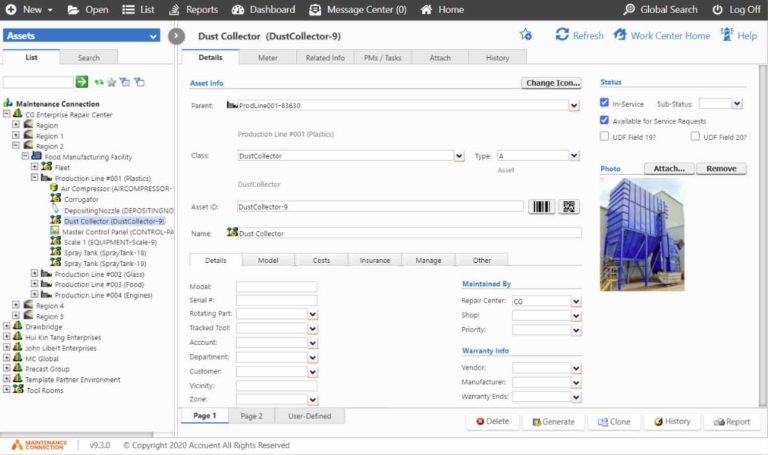
Organize assets so that a single vehicle can contain subsystems such as engine, transmission, and brakes. Each subsystem can then list individual components like fuel injectors or brake pads. This structure lets a technician record work at the right level without creating duplicate vehicle records. When you Set up a fleet vehicle maintenance app using this hierarchy, future reports can show which subsystem generates the most repair cost. Begin with the most common vehicle types in the fleet and expand later. The hierarchy also supports parts inventory links so stock levels update automatically when a component is replaced.
Create work order templates for typical truck jobs
Templates speed up entry for jobs that repeat often. A standard brake job template already lists common parts and labor steps. An oil change template includes fluid type and filter part numbers. When you Set up a fleet vehicle maintenance app with ready templates, technicians spend less time typing and more time on the vehicle. Allow templates to be edited on the fly for unusual situations. Keep a master list of approved templates so new hires learn the expected format quickly. Templates also reduce variation between different technicians working on the same type of job.
Configure offline or mobile capture if you use a truck fleet management software free download
Field work often happens where network coverage is poor. Enable offline mode so completed work orders sync once the device reconnects. When you Set up a fleet vehicle maintenance app with reliable offline capture, drivers never lose data during a route. Test the sync process with a full day of inspection forms to confirm nothing is lost. Set a visible warning when the app is operating offline so users know the record is not yet permanent. Mobile forms should mirror the desktop layout closely enough that training remains simple.
Standardize photo or document attachments for invoices and inspections
Photos of damaged parts or completed work provide evidence that text alone cannot match. Require at least one image for any repair above a chosen dollar threshold. When you Set up a fleet vehicle maintenance app that accepts attachments easily, warranty claims move faster. Name the attachment fields clearly so everyone knows whether the photo shows before, during, or after the job. Store invoices as PDFs attached to the same record so cost and work details stay together. Limit file size to keep the database responsive during searches.
Build review and approval steps to prevent incomplete entries
Even with required fields, occasional records still arrive missing context. Add a review step that flags entries lacking a photo or parts list. A supervisor can then request the missing information before the record closes. When you Set up a fleet vehicle maintenance app with this gate, service history stays complete without slowing daily work. Keep the review queue visible so nothing sits unaddressed for more than a day. Approval can be skipped for low-cost routine jobs to avoid unnecessary delays.
Test data export from the free tier and verify service history continuity
Before relying on the system, export a sample of records and check that every required detail appears in the file. Verify that dates, odometer readings, and technician names remain intact after the export. When you Set up a fleet vehicle maintenance app and confirm export quality early, future migrations or audits become far less stressful. Run the same test again after any software update. Keep one exported file from each quarter as a backup reference in case the platform changes its format later.
How to Do It
- Step 1: Define maintenance record categories (PM, inspections, repairs, tires, fluids). Begin by listing every type of work that will ever be logged inside your fleet vehicle maintenance app that actually captures service history. Create separate categories for preventive maintenance, safety inspections, corrective repairs, tire services, and fluid changes. Each category receives its own set of default fields so drivers and technicians know exactly what information belongs in that record. When you set up a fleet vehicle maintenance app with clear categories, later searches and reports become reliable. Most fleets discover that six to eight well-chosen categories cover 95 percent of daily activity while still allowing custom entries for unusual jobs.
- Step 2:
Further Reading
- What should a salesforce maintenance schedule cover for recurring jobs and handoffs?
- Mining, food processing, and school maintenance: choosing a maintenance system by constraints
- Verisae maintenance app vs Oracle Fusion maintenance cloud: what breaks first in real plants?
- Set up a maintain application workflow using paper based maintenance without losing control
- Which maintenance application fits your reliability workflow: web based, CMMS, or schedule-only?