Accruent Cmms Vs Maximo, IFS, Connect: Maintenance Feature Fit
Accruent CMMS handoff focus

Enterprise teams often face the same core challenge when they evaluate maintenance management system software. The real question is how work orders move from the planning stage through field execution. They must reach reliable reports that leadership can act on. Accruent cmms stands out because it focuses on exactly those handoffs. It also supports multi-site operations that need consistent processes across plants.
Industrial buyers comparing options such as IBM Maximo CMMS, IFS CMMS software, and Connect CMMS usually start by mapping their current pain points. These include preventive maintenance scheduling and data flow. A clear picture of these flows helps teams avoid implementations that look strong on paper. They often fall short when technicians work offline. Spare parts data must also sync with procurement systems.
In most organizations the selection process therefore centers on how each platform handles work order templates. It must also cover mobile cmms support and audit-ready maintenance histories. Teams avoid flashy dashboards alone. Teams that have previously tried to stitch together multiple tools often discover that fragmented data creates more problems than it solves. Regulatory audits require a single source of truth for every asset history.
Practical experience shows that starting with a documented list of daily pain points gives evaluators a stronger foundation. Examples include missed PMs due to poor scheduling or lost parts requests. This works better than simply comparing feature checklists.
Preventive schedules from asset data

Planning depth
preventive maintenance scheduling, work order templates, and approval workflows
Accruent cmms gives planners flexible calendars that pull asset data directly into recurring schedules. This happens without manual duplication. Work order templates can embed safety steps, required parts lists, and skill requirements. Every job starts with the same baseline. Approval workflows route requests through supervisors or engineers based on cost thresholds or risk levels. This keeps high-impact changes visible.
Teams that manage multiple facilities find this structure useful. One central rule set can apply across sites. Local overrides remain possible. IBM Maximo CMMS offers similar scheduling depth. It often requires more configuration for multi-site approval chains. IFS CMMS software tends to tie planning tightly to its ERP layer. This can speed up material reservations. It adds complexity when plants run separate procurement tools.
Connect CMMS keeps the interface lighter. Smaller teams finish template setup faster. They may need extra steps to enforce the same approval gates that larger organizations require. What to ask the vendor: Can the system push schedule changes to mobile devices in real time? How many approval levels can be configured without custom code? Does the platform track template version history for compliance audits?
One practical tip is to pilot the approval workflow on a single asset class first. Critical pumps offer a good example. Roll it out plant-wide only after testing. This approach reveals bottlenecks early. It lets planners adjust thresholds without disrupting ongoing operations. Another consideration is how seasonal demand spikes affect schedule flexibility. Accruent cmms allows temporary overrides. They still preserve historical data for later analysis.
Execution experience
mobile cmms support, offline handling, and technician field reporting using cmms app patterns
Technicians using Accruent cmms can open work orders on tablets or phones. They capture photos and record meter readings even when the network drops. Offline handling stores completed forms locally. It syncs them once connectivity returns. This prevents lost data on large campuses or remote sites. Field reporting follows familiar cmms app patterns. Users see the same steps on a desktop planning screen or a phone in the plant. The follow-up piece ibm maximo maintenance management reduces unplanned downtime covers this in more practical detail. A closely related walkthrough, Which CMMS fits your workflow: ibm maximo cmms vs Accruent?, picks up where this section ends.
IBM Maximo CMMS provides robust mobile options. It sometimes requires separate apps for full offline capability. IFS CMMS software integrates execution closely with its broader enterprise suite. This helps when technicians also manage inventory counts. It can feel heavy for teams that only need quick work order updates. Connect CMMS emphasizes simple mobile forms that load quickly. Advanced condition monitoring may need additional modules.
What to ask the vendor: Does the mobile cmms support barcode scanning for parts and assets without extra plugins? How long can a device stay offline before sync warnings appear? Can technicians attach multiple file types directly from the cmms app? In practice, many sites find that providing technicians with a short checklist of offline scenarios during training reduces sync errors dramatically.
For example, one facility tested devices in areas known for signal dead zones. It confirmed that photos and notes remained intact after several hours without connectivity. This kind of hands-on validation often proves more valuable than vendor demonstrations alone.
Asset and hierarchy modeling
standardizing locations, assets, and failure codes
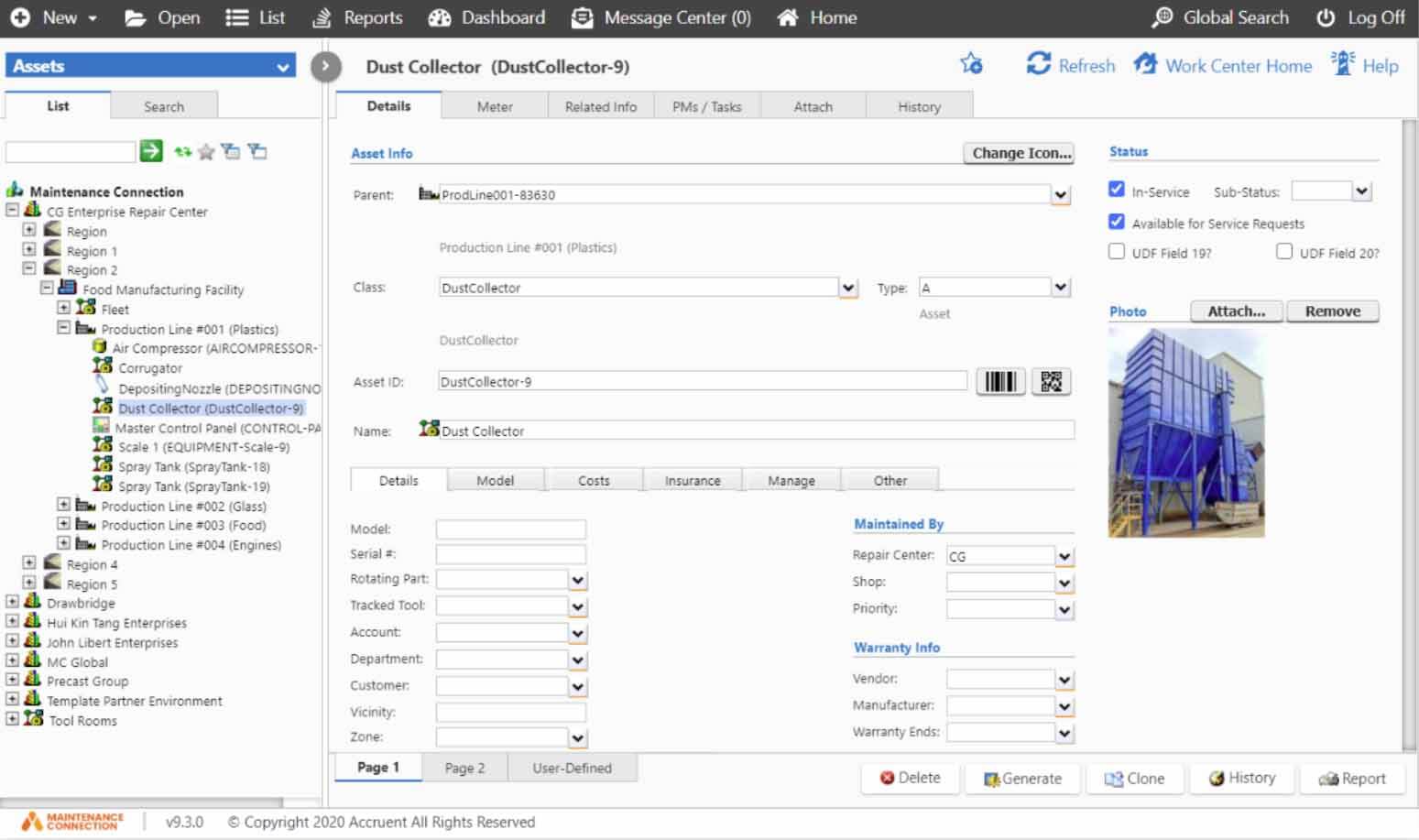
Accruent cmms lets teams build location hierarchies that mirror actual plant layouts. They run from site level down to individual motors or pumps. Asset records can hold failure codes, maintenance intervals, and warranty dates in one place. Planners see risk patterns quickly. Standardized codes improve reporting consistency across shifts and sites.
IBM Maximo CMMS uses a mature asset model that supports deep parent-child relationships. This benefits complex equipment trains. It requires careful setup to avoid duplicate entries. IFS CMMS software aligns asset data with its ERP structure. This reduces re-entry when assets move between production and maintenance ownership. Connect CMMS offers straightforward hierarchy tools that work well for facilities with fewer asset classes. They may need custom fields for specialized failure tracking.
What to ask the vendor: Can failure codes be imported from existing spreadsheets without data loss? How many hierarchy levels does the system support before performance slows? Does the platform enforce unique asset identifiers across all sites? A useful next step is to involve operators in the hierarchy design process. They often notice subtle equipment relationships that planners miss.
This collaboration leads to more accurate failure code libraries. It supports better trend analysis over time. Teams should also consider how future plant expansions will affect hierarchy scalability.
Integrations and data flows
linking to inventory, procurement, and enterprise systems; include a specific checklist for maintenance management apps style add-ons where relevant
Accruent cmms connects to inventory systems. Parts reservations update automatically when a work order closes. Procurement triggers can fire when stock falls below reorder points. Enterprise resource planning links keep cost data flowing into finance reports. Maintenance management apps often add barcode scanning, IoT sensor feeds, or shift handover notes as modular extensions. IBM Maximo CMMS has extensive integration libraries that cover most major ERP platforms. They can increase licensing costs.
IFS CMMS software already lives inside an ERP environment. This simplifies parts and labor tracking. It may limit choices if the plant uses a different core system. Connect CMMS focuses on lighter connectors that reduce setup time for basic inventory syncs. Checklist items to review include whether the platform supports REST APIs, real-time parts availability checks, and automated purchase order creation from work orders.
What to ask the vendor: Which pre-built connectors exist for the current ERP? Can the system push downtime events to a central operations dashboard? How are data mapping changes handled after an upgrade? One practical tip is to map every critical data flow on paper before any integration testing begins. This exercise often uncovers hidden dependencies. Custom part numbering schemes must be translated during sync.
Organizations that document these mappings early report smoother go-live experiences. They see fewer post-implementation surprises.
Reporting and reliability analytics
PM compliance, downtime reporting, recurring issues, and audit-friendly maintenance histories
Accruent cmms produces compliance dashboards that track preventive maintenance completion rates by site and asset class. Reports combine work order duration with failure codes to highlight repeat problems. Maintenance histories remain searchable for audits. Every change carries timestamps and user IDs. IBM Maximo CMMS includes reliability analytics that calculate mean time between failures directly from work order data.
IFS CMMS software ties reports to production metrics. Teams see how maintenance affects overall equipment effectiveness. Connect CMMS delivers clear compliance summaries. It may require export steps for deeper trend analysis. What to ask the vendor: Can the reports export in formats required by regulatory bodies? Does the system flag recurring issues automatically and suggest root cause investigations? How far back can audit logs be retained without performance impact?
A helpful addition is to schedule quarterly report reviews with both maintenance and operations leadership. These sessions surface whether the metrics truly drive better decisions. They avoid creating more paperwork. Over time, this habit turns reporting from a compliance burden into a genuine reliability improvement tool.
Multi-site preventive maintenance standardization
Multi-site manufacturer standardizing preventive maintenance
A packaging company with four plants used Accruent cmms to replace separate spreadsheets. Planners created shared work order templates for conveyor systems. They set the same inspection intervals at every location. After six months the platform showed a twelve percent rise in PM compliance. Fewer emergency calls occurred on similar assets. Technicians accessed the same mobile cmms screens regardless of site. This reduced training time when staff moved between facilities. Leadership reviewed one compliance report instead of four separate files. The standardization effort also revealed that one plant had been performing unnecessary tasks on non-critical equipment. It freed up technician hours for higher-value work. Over the following year, the company extended the same template approach to packaging lines. It achieved similar gains in consistency.
Industrial operator linking maintenance with spare parts and leadership reports
A chemical processing site integrated Accruent cmms with its inventory system. Parts reservations updated stock levels instantly. When a critical pump failed, the work order pulled the correct spare part list. It triggered an automatic reorder. Monthly downtime and PM compliance reports reached the operations director without manual compilation. The maintenance team also used failure code trends to adjust lubrication schedules on similar assets across two production lines. This integration reduced emergency procurement costs by nearly twenty percent in the first quarter. Technicians reported higher confidence that parts would be available when needed. This improved overall job completion rates.
Scoring vendors by workflow fit
Shortlisting vendors starts with matching planning depth, mobile execution support, integration needs, and reporting requirements to the actual workflows in each plant. Build a simple comparison sheet that lists the five evaluation areas covered above before any vendor demo. Procurement and maintenance teams can then score responses consistently. They avoid decisions driven by the loudest presentation. Accruent cmms often fits organizations that need balanced control across planning, field work, and data flows without heavy ERP entanglement. Once the sheet is complete, schedule focused demos that test only the items marked as critical rather than every available feature. This approach keeps evaluations grounded in daily operations instead of feature lists. A final recommendation is to include a cross-functional review meeting after each demo round. Feedback from technicians, planners, and finance stays aligned throughout the process. This step prevents last-minute objections that can delay selection by weeks or even months.
You May Also Like
- What should a salesforce maintenance schedule cover for recurring jobs and handoffs?
- Mining, food processing, and school maintenance: choosing a maintenance system by constraints
- Verisae maintenance app vs Oracle Fusion maintenance cloud: what breaks first in real plants?
- Set up a maintain application workflow using paper based maintenance without losing control
- Which maintenance application fits your reliability workflow: web based, CMMS, or schedule-only?