Simpler Maximo asset history for equipment maintenance tracking app
Equipment Maintenance Record Challenges in Industrial Settings
Industrial teams often struggle to keep complete equipment maintenance records when they rely on paper logs or scattered spreadsheets. Inspections get missed, repair details vanish during shift changes, and compliance audits turn into frantic searches for missing data. An equipment maintenance tracking app solves these gaps by capturing every inspection, repair, and part replacement in one structured system. In practice, this means a single source of truth replaces the risk of lost sticky notes or overwritten Excel cells that have derailed more than one audit preparation session.
The goal is Maximo-style traceability without the heavy configuration and licensing layers. This guide lays out the exact data fields, capture rules, and reporting needs that turn raw events into a reliable service history. Maintenance managers and reliability leaders can use these requirements to evaluate or build a lighter solution that still meets audit and handoff demands. Many teams discover that once the basics are in place, they can later layer on advanced analytics without starting over from scratch.
An equipment maintenance tracking app must record asset identifiers, inspection results with photos and notes, full service timelines, repair triggers with linked causes, and compliance summaries to match the traceability expectations once reserved for enterprise CMMS platforms. Practical experience shows that plants using such apps reduce the time spent hunting for records by roughly 70 percent during surprise regulatory visits.
Core Requirements for Reliable Asset History
Define the asset and event data model (equipment ID, location, criticality, failure codes)
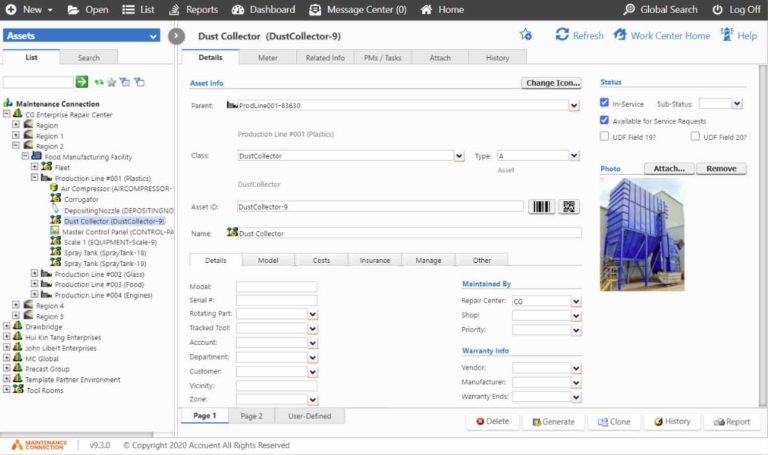
Every equipment maintenance tracking app starts with a clear asset register. Each record needs a unique equipment ID, physical location code, criticality rating, and standardized failure codes. Without these fields, later reports cannot group similar issues or prioritize high-impact assets. Teams that invest time upfront defining these elements avoid the common headache of mismatched data when merging records from different departments or acquired facilities.
Equipment ID usually follows a plant numbering scheme such as PUMP-0427 or CONVEY-103. Location codes tie the asset to a specific area or line so technicians know exactly where to go. Criticality ratings range from low to safety-critical and determine inspection frequency in most systems. A good rule of thumb is to review criticality scores annually, since process changes or new safety regulations can shift an asset’s priority.
Failure codes come from a controlled list that includes bearing wear, seal leak, or electrical fault. These codes let teams analyze patterns across similar assets. A well-designed data model also stores parent-child relationships so a motor linked to a pump shows its full history in one view. This structure supports the traceability that reliability programs require. One plant reliability engineer shared that adding parent-child links cut their mean time to repair by 15 percent because technicians could instantly see related component histories.
Maintenance inspection capture rules for your equipment maintenance tracking app
Inspection rules inside an equipment maintenance tracking app dictate how data enters the system. Checklists must be version-controlled, questions need pass-fail options, and every entry requires timestamp, inspector name, and optional photo or note attachment. These rules prevent incomplete records that break audit trails. Adding version history also protects against accidental changes during annual procedure updates.
Each checklist item carries a clear acceptance criterion. A bearing temperature reading, for example, might flag above 80 °C as fail. Photos attached to failed items give context for the next technician. Inspector attribution ensures accountability and meets the documentation standards referenced in computerized maintenance management system descriptions on Wikipedia. In one food-processing facility, requiring photos on every failed seal inspection helped identify a recurring installation error that had previously been blamed on part quality alone.
Rules also cover conditional logic. A failed item can trigger a work order automatically. The app records who performed the inspection, when it occurred, and any deviations noted during the task. This level of detail survives personnel changes and supports regulatory reviews without extra manual effort. Practical tip: build a short training video for new hires that walks through the exact steps of submitting a complete inspection, which dramatically reduces follow-up questions from supervisors.
Maintenance record structure that survives handoffs
Service history inside the equipment maintenance tracking app must remain intact across shifts and contractors. The structure includes a chronological timeline, labor hours logged against each event, technician notes, and links to related work orders. Any missing link breaks the chain of custody for that asset. Real-world handoffs improve when the timeline view is the default screen technicians see upon opening the app.
The timeline displays every inspection, lubrication, repair, and part replacement in date order. Labor entries capture who worked, how long, and what was observed. Notes fields accept free text while still tagging key observations with the same failure codes used in the asset model. Adding quick-pick tags for common observations speeds entry while keeping data consistent for later analysis. this page documents how this works in a real deployment.
Related work order links let a user jump from a current repair back to the inspection that flagged the issue. This connection proves especially useful during root-cause reviews. When the record stays complete, new technicians avoid repeating prior mistakes and planners see the true cost of ownership for each asset. A maintenance supervisor at a bottling plant noted that complete handoff records eliminated nearly all repeat bearing failures within the first six months of use.
Repair tracking mechanics (trigger conditions, linked cause and effect, spare parts trace)
Repair tracking begins when an inspection or sensor reading meets a trigger condition. The equipment maintenance tracking app then creates a repair event that links back to the original finding. Cause and effect fields capture what failed and why, while spare parts entries record part numbers, quantities, and serial numbers where applicable. Linking cause and effect fields early prevents the all-too-common situation where repair notes become vague over time.
Trigger conditions can be manual or automatic. A failed checklist item or a vibration reading above a set threshold both qualify. Once triggered, the record requires a cause code and an effect description so later analysis can group similar failures. Parts traceability uses the same part master list across all assets. Consider adding a simple barcode scan option so technicians can pull part data without typing, which cuts errors and speeds the process during urgent repairs.
Serial-number tracking on critical components supports warranty claims and recalls. The app also logs consumables such as oil or filters so total maintenance cost calculations remain accurate. These mechanics turn isolated repairs into a connected history that reliability teams can query for improvement opportunities. One automotive supplier used this data to justify switching to a higher-grade lubricant, cutting unplanned downtime by 22 percent.
Reporting outputs that prove compliance (audit trail, overdue inspections, downtime summaries)
Compliance reports pull directly from the structured data collected by the equipment maintenance tracking app. Required outputs include a complete audit trail, lists of overdue inspections, and downtime summaries broken down by asset and cause. These reports satisfy both internal reviews and external auditors. Scheduling automatic delivery of these reports to key stakeholders keeps everyone aligned without extra meetings.
The audit trail shows every change to a record with user ID and timestamp. Overdue inspection lists flag assets past their scheduled date and can be filtered by criticality. Downtime summaries calculate lost production hours and link them to specific failure codes. Adding trend lines to downtime reports often reveals seasonal patterns that help with budgeting spare parts inventory.
Many organizations export these reports on a monthly or quarterly cycle. The same data also feeds reliability dashboards that track mean time between failures. When reports generate automatically from the app, teams spend less time assembling evidence and more time addressing the issues the data reveals. A practical tip is to create a one-page executive summary view that highlights only the top three overdue items and the highest-cost failure modes.
Real-World Deployment Scenarios
Plant asset with recurring inspections
A packaging plant runs a rotary filler that requires weekly visual and vibration checks. The equipment maintenance tracking app holds a 12-item checklist that includes seal condition, bearing noise, and guard integrity. Each week the technician opens the app on a tablet, completes the checklist, and attaches a photo of any wear. Failed items automatically generate a work order that appears on the next shift handover report. Over six months the history shows three seal replacements tied to the same vibration trend, allowing the reliability team to adjust the replacement interval before a major stoppage occurs. The plant later added temperature sensors that fed directly into the same app, further reducing manual checks.
Fleet asset where repairs link back to inspection findings
A regional delivery fleet equips each truck with a mobile enterprise asset management module inside the same equipment maintenance tracking app. Drivers perform pre-trip inspections that record tire tread, brake pressure, and fluid levels. When a driver marks brakes as marginal, the app creates a repair ticket that includes the original inspection photo and reading. Mechanics later close the ticket with part numbers and labor hours. The full chain remains visible when the fleet manager reviews compliance for annual DOT audits. Fleet managers report that the linked records also help negotiate better insurance rates by demonstrating consistent maintenance discipline.
Next Steps After Defining Your Requirements
The requirements above form a practical checklist for any team moving from paper or spreadsheets to structured digital records. Start by mapping your current asset list into the data model fields, then build inspection checklists that match regulatory and operational needs. Test the full flow with one equipment category before expanding. A phased rollout keeps the learning curve manageable and lets early wins build internal support.
Choose a maintenance record app or maintenance record software that supports the timeline, trigger, and reporting features described. Many organizations begin with an equipment maintenance app and later connect it to broader cmms programs as data volume grows. Pilot results usually show faster handoffs and fewer repeat failures within the first quarter. Tracking pilot metrics such as record completion rate and time-to-close helps justify further investment.
Further workflow examples appear on this page for teams ready to configure notifications and approval steps. The same structured approach also supports mobile enterprise asset management rollouts across multiple sites. Begin with the data model and inspection rules, then layer on repair tracking and reporting once the foundation is stable. Teams that document lessons learned during the pilot often accelerate adoption at additional locations.
How many data fields does a basic equipment maintenance tracking app need at minimum?
Most successful implementations start with eight core fields: equipment ID, location, criticality, failure code, inspection date, result, inspector, and notes. Additional fields such as photo attachment and work-order link improve traceability but can be added after the first pilot. Keeping the initial set small speeds adoption while still delivering audit-ready records.
Can the same app handle both plant assets and fleet vehicles?
Yes. The data model supports multiple asset classes by using flexible location codes and equipment-type filters. A single equipment maintenance tracking app instance can store rotary fillers alongside delivery trucks as long as the failure code list covers both mechanical and automotive issues. Separate dashboards then surface the relevant overdue lists for each group. Many organizations start with plant assets and add fleet modules once the core system proves stable.
What happens when an inspection fails the pass-fail rule?
The app immediately creates a linked repair event that carries forward the original inspection data. The technician assigned to the repair sees the checklist item, photo, and any notes without re-entering information. This automatic trigger reduces the chance that a flagged issue slips through shift changes. Supervisors can also set escalation rules so critical failures notify the reliability engineer directly.
How long does it take to generate compliance reports?
Once the data model and inspection rules are in place, monthly audit-trail and overdue-inspection reports generate in under two minutes. The summaries pull directly from existing records, so no manual data cleanup is required. Teams typically schedule the reports to run overnight and review them the next morning. Custom filters let managers focus on safety-critical assets first during high-pressure audit seasons.
Is it possible to import existing paper or spreadsheet history?
Most maintenance record software includes a CSV import template that maps columns to the required fields. Critical assets receive priority during migration so their full service timelines remain intact. After the initial load, new events flow through the app and gradually replace the legacy files. One team found that dedicating a single technician for two weeks to the import process produced cleaner data than attempting a rushed bulk migration.
How often should failure codes be reviewed and updated?
Review failure codes at least once a year or after any major equipment upgrade. New failure modes discovered during root-cause analysis should be added promptly so the list stays relevant. Keeping codes current prevents technicians from forcing observations into outdated categories that distort long-term trend reports.
What mobile features matter most for field technicians?
Offline capability tops the list because plants and remote sites often have spotty connectivity. Large touch targets, quick photo capture, and voice-to-text notes also boost completion rates. Technicians appreciate being able to start an inspection on a phone and finish it on a tablet without losing progress.
- Maintenance log app structure that prevents missing history: what to require in every equipment record
- Maintenance record app feature comparison for equipment histories: inspection, work orders, and repair trails
- Oracle Fusion Maintenance Cloud vs schooldude maintenance direct app for asset tracking workflows
- Maintenance management for mining operations: choosing a software fit for harsh environments
- CMMS on Android for field crews: when mobile maintenance fails and what to fix