How preventive maintenance in maximo uses work orders
The complete chain from schedule definition to service history in preventive maintenance in maximo
preventive maintenance in maximo goes far beyond simply entering time-based intervals. It forms an integrated flow. The flow starts with asset records. It moves through automated schedule generation. It produces work orders. It supports field execution. It ends with updated service histories that feed reliability metrics. Operations leaders who treat it as isolated calendar entries often end up with incomplete data and missed work. In practice this means mapping every maintainable item to its parent location first. Then confirm meter types before any schedule activates. Finally ensure technicians close each order with actual readings rather than generic status updates. Teams that skip these steps quickly discover that the next due date calculations drift. Emergency repairs spike because historical trends never materialize.
The system relies on accurate asset hierarchies. It also relies on properly configured preventive maintenance records. Execution fields must capture real outcomes. Mobile capture closes feedback loops. When these pieces align, teams reduce unplanned downtime. They also build measurable trends from recurring tasks. Consider a manufacturing plant that aligned its hierarchy and meter data before rollout. Within six months unplanned downtime dropped 22 percent. This happened because work orders arrived with the correct spare parts already listed. The same alignment also lets planners spot when an asset class begins showing shorter intervals than expected. It prompts a design review instead of endless reactive fixes.
Preventive maintenance in maximo succeeds when every step from definition to closeout stays connected inside one record set. This single-source approach eliminates the version-control headaches that arise when spreadsheets and paper logs compete with the system. It also creates an audit trail that satisfies both internal reliability goals and external compliance audits without extra manual effort.
Core elements that make preventive maintenance in maximo reliable from start to finish
1
Building the asset and hierarchy assumptions that scheduling depends on
Preventive maintenance in maximo begins with a clean asset structure. Each piece of equipment must sit inside a location hierarchy. Schedules can reference the correct parent and child records. Without this foundation, generated work orders point to the wrong assets. They create duplicate entries later. A practical first step involves exporting the current asset list. Then walk the floor with a barcode scanner. Verify every tag matches its physical location. This simple cross-check prevents the common problem of duplicate asset numbers that appear when legacy systems are merged without reconciliation.
Teams usually start by confirming that every maintainable item carries a unique identifier. Each item belongs to the right system or location. Meter definitions also matter here. When runtime hours or cycle counts drive the schedule, the asset record must already include those meter types. This must happen before any preventive maintenance record is created. Planners who forget to define meter rollover points or warning thresholds discover that work orders stop generating. This occurs once readings exceed the initial limit. Adding a short training session on meter setup during the hierarchy build saves hours of later troubleshooting.
Many organizations import legacy data from spreadsheets at this stage. The import succeeds only when location paths and classification attributes match the Maximo data model exactly. A mismatched hierarchy forces manual fixes after the first set of work orders appears. One facilities group learned this the hard way. A building-level location was imported with an extra space in the path. Every child asset generated separate work orders. They did not roll up under a single parent schedule. Re-importing with corrected paths resolved the issue before the first preventive maintenance cycle ran.
Once the structure stabilizes, planners can attach spare parts lists and safety plans directly to the asset. These attachments travel forward automatically when the schedule produces a work order. They reduce the chance that crews arrive without required materials or permits. In addition, linking rotating spares to the asset record lets the system track which specific pump or motor is currently installed. It gives future work orders accurate serial numbers without extra lookup time.
2
Defining preventive maintenance schedules that produce the right work orders
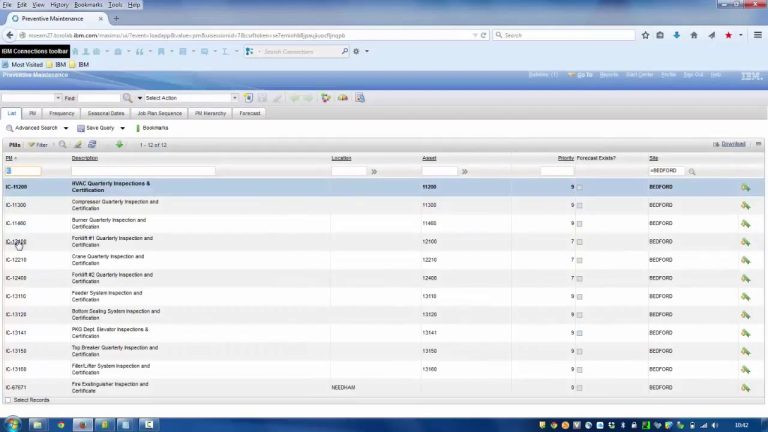
Preventive maintenance in maximo lives inside the preventive maintenance application. Each record combines a schedule pattern with an asset or location reference and a job plan. The pattern can be calendar-based, meter-based, or a combination of both. Inside the preventive maintenance application users also set lead-time offsets. Materials can be kitted days before the work order releases. A small configuration prevents last-minute warehouse runs.
Calendar intervals work well for time-sensitive tasks such as quarterly filter changes. Meter-based intervals suit assets whose wear depends on actual usage. A common approach sets both a time limit and a usage limit. Whichever threshold arrives first triggers the work order. This dual-trigger method proved especially useful for a fleet operator. Vehicles sat idle for weeks. They accumulated high engine hours during busy seasons. The meter reading caught the usage spike. The calendar fallback prevented tasks from being skipped during low-activity periods.
The job plan attached to the preventive maintenance record lists the required tasks, labor estimates, and materials. When the schedule engine runs, it copies these details into the new work order without manual re-entry. Planners review the generated list each week. They adjust priorities before releasing the orders to the field. Adding conditional tasks inside the job plan keeps routine orders short. An example is “inspect belt only if runtime exceeds 5000 hours.” It still captures the extra data needed for deeper analysis later.
Seasonal or shutdown windows can be handled by adding lead-time offsets or blackout periods inside the same preventive maintenance record. This keeps the schedule realistic without creating separate records for every special case. Many teams also activate the “do not generate” flag during planned outages. The system automatically skips those cycles. It restarts the clock once operations resume.
3
Work order execution fields that matter for preventive maintenance records
Once a work order reaches the technician, several fields determine whether the preventive maintenance in maximo history stays useful. Actual labor hours, materials consumed, and failure codes must be recorded before the order is closed. Capturing the exact part number instead of a generic description further improves inventory accuracy. It reveals which components fail more often than expected.
Status changes also carry weight. Moving an order from “in progress” to “completed” or “cannot complete” updates the next due date calculation automatically. Leaving orders in intermediate statuses blocks the schedule engine from generating the following cycle. A simple dashboard alert that flags open preventive maintenance work orders older than 48 hours helps supervisors catch these stalled records. It prevents them from cascading into missed cycles.
Notes entered in the long description field become part of the permanent asset history. Future planners rely on these notes when they review why a task took longer than estimated. They also review why certain parts were substituted. Short or missing notes reduce the value of the entire preventive maintenance program over time. One reliability team began requiring a minimum 50-character note before closeout. Within a quarter they noticed a measurable improvement in the quality of the reports. Technicians now documented subtle observations that later explained vibration spikes.
Some sites add custom fields for condition readings taken during the visit. These readings sit alongside the standard completion data. They support later analysis without requiring a separate inspection module. For example, logging oil clarity or bearing temperature at each visit creates a running data set. It can be plotted directly inside Maximo reports.
4. Mobile or field capture patterns that prevent history gaps
Preventive maintenance in maximo loses accuracy when technicians return to the shop and enter data hours later. Mobile enterprise asset management tools let crews update work orders on site while the details remain fresh. A practical tip is to configure the mobile app so the most common failure codes appear in a quick-pick list. This cuts entry time while still enforcing consistent terminology across shifts.
Barcode or QR scanning of the asset tag confirms the correct record before any data entry begins. Time stamps recorded at scan-in and scan-out give planners reliable actual-duration numbers for future job-plan estimates. Over several months these timestamps often reveal that certain tasks consistently take 30 percent longer than planned. They prompt job-plan revisions before budgets are finalized.
Photo attachments taken through the mobile interface travel directly into the work order document library. A picture of a worn seal or a leaking fitting provides context that text alone cannot convey. It supports warranty or insurance claims when needed. Several plants now require at least one before-and-after photo on every preventive maintenance work order. The visual record has reduced repeat visits. Follow-up crews can see exactly what was replaced last cycle.
Offline capability matters in facilities where network coverage is spotty. The mobile client queues changes locally and synchronizes once connectivity returns. It prevents the creation of conflicting records that must be merged manually. Testing the offline mode during pilot rollouts catches sync issues early. It builds technician confidence that their work will not be lost.
5
Turning recurring PMs into measurable reliability signals and where predictive maintenance applications connect without replacing PMs
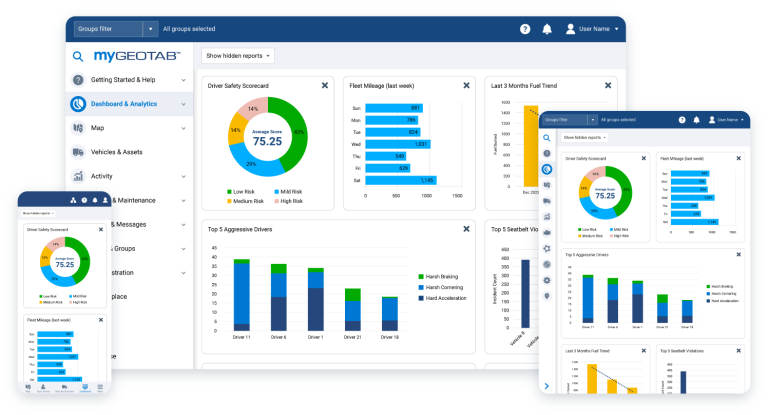
Completed preventive maintenance in maximo records accumulate into trend data when failure codes and meter readings are captured consistently. Reliability engineers review mean time between failures and mean time to repair by pulling reports against the asset class rather than individual work orders. These class-level reports quickly surface patterns such as a particular motor brand failing twice as often as its peers. They guide future capital decisions.
These trends highlight assets that need design changes or more frequent intervals. They also show where intervals can safely be extended. This frees technician time for higher-value work. One site used six months of data to move a monthly lubrication task to every six weeks after confirming lubricant life remained within specification. It saved roughly 40 labor hours per quarter.
Predictive maintenance applications sit alongside this structure rather than replacing it. Vibration or temperature sensors feed alerts into Maximo as work requests. The existing preventive maintenance schedule continues to run. It provides the baseline tasks that predictive data alone cannot cover. For instance, even the best sensors cannot replace the visual inspection of guard integrity or the manual check of safety interlocks that remain part of the standard preventive maintenance job plan.
Integration points usually involve an enterprise service bus or direct API calls that create or update work orders from external condition-monitoring systems. The preventive maintenance record remains the single source of truth for planned versus actual history. When a sensor alert arrives, the system can either append it to an existing scheduled order or generate a new corrective work order. It still preserves the original preventive maintenance cadence.
this page explains how one industrial site combined its existing preventive maintenance schedules with sensor-driven alerts inside a single connected workflow. The result was a hybrid program where routine tasks continued on schedule while high-priority alerts received immediate attention without disrupting the overall plan.
Two practical deployments of preventive maintenance in maximo
Facilities team managing recurring filter inspections
A large distribution center runs quarterly filter changes on thirty air-handling units. The asset hierarchy places each unit under its building location. Each unit carries a runtime meter. The preventive maintenance record uses a 2000-hour meter trigger with a 90-day calendar fallback. Technicians receive the work order on their mobile devices. They scan the unit tag. They replace the filter. They record the new meter reading before closing the order. Over two years the accumulated data showed that actual filter life averaged 1850 hours. The team tightened the interval slightly. They reduced emergency replacements. They also discovered that filters in the loading-dock units lasted 15 percent longer than those near the packaging lines. This led to differentiated schedules that further optimized labor.
Fleet maintenance team preserving service history across multiple sites
A regional trucking company maintains sixty vehicles that operate from three terminals. Each vehicle record includes both engine-hour and odometer meters. Preventive maintenance records generate work orders for oil changes at 15,000 miles or 300 engine hours. Drivers use the mobile client at the terminal to confirm completion. They attach photos of fluid levels. Because every order closes with meter readings and photos, warranty claims for engine work now reference complete service histories instead of paper logs that often went missing during driver changes. The same photos have helped the maintenance team identify early signs of coolant leaks that were previously caught only after roadside breakdowns.
Minimum viable configuration for preventive maintenance scheduling and execution
- Every maintainable asset must exist in a location hierarchy before any preventive maintenance record is created.
- Each preventive maintenance record requires at least one job plan that lists tasks, labor, and materials.
- Work orders must reach a closed status with actual hours and failure codes recorded to advance the next due date.
- Mobile capture should include asset confirmation and photo attachments to keep field data complete.
- Reports should pull from closed preventive maintenance records rather than open work orders to avoid partial data.
- Define meter rollover thresholds and warning limits during asset setup so schedules never stall at high readings.
- Enable offline mobile sync testing before full rollout to prevent data loss in low-coverage areas.
Next steps before requesting a preventive maintenance in maximo demonstration
Before scheduling any software demo, gather the current list of preventive maintenance intervals, the existing asset hierarchy export, and the fields technicians already capture on paper or in spreadsheets. These three items reveal the gaps that digital workflows must close. A quick review of the exported hierarchy often uncovers duplicate location names or missing parent-child links that would otherwise surface only after the first schedule run.
With that baseline in hand, a focused demonstration can show exactly how schedules will generate orders, how mobile updates will feed history, and where predictive maintenance applications can layer on top without disrupting the established preventive maintenance in maximo cadence. Organizations that prepare this information first finish implementation faster and see cleaner data from the first cycle of preventive maintenance in maximo onward. Bringing sample job plans and a short list of common failure codes to the demo also lets the vendor illustrate exactly how those items will appear inside generated work orders. It turns an abstract presentation into a practical walkthrough tailored to the site’s actual assets.
Related Topics
- IBM Maximo maintenance program versus preventive-first scheduling in a mobile-first CMMS app
- The preventive maintenance app requirements checklist that prevents missing service history
- CMMS programs versus preventive maintenance apps: choosing software for scheduled work in the field
- Maintenance management for mining operations: choosing a software fit for harsh environments
- CMMS on Android for field crews: when mobile maintenance fails and what to fix