Maintenance Request App: What to Capture at Intake

Maintenance Request App: Why Intake Quality Decides Whether a Maintenance Job Gets Fixed Fast
A maintenance request app is only as useful as the information a field crew puts into it at the moment of submission. When a technician standing next to a pump types “making noise, please check,” the dispatcher has to start over. Somebody calls back, someone guesses which pump it is, and the job sits in a queue while the equipment keeps running badly. Most of that delay traces back to the intake form, not the repair itself.
This article works as a checklist for anyone designing or reviewing a maintenance request system used by mobile crews. It covers ten fields and data points that tend to decide whether a request gets routed correctly the first time. Along the way it looks at how a maintenance request app should guide people toward complete answers without slowing them down. Asset management and work order tracking are the broader areas this topic sits within, and intake is where those two meet the people doing the work.
The short answer is that a good intake using a maintenance request app captures the right asset, a specific symptom, a precise location, safety and urgency signals. It also includes a confirmation that the request is not a duplicate. Each of those fields removes a question a planner would otherwise have to ask. Get them right and triage gets faster, rework drops, and crews spend less time on the phone.
Before going item by item, one caveat. No form fits every plant. A food processor, a mine site, and a campus facilities team will each need different fields. Treat the list below as a starting point to test against your own work orders, not a standard you must copy.
The Ten Intake Fields Mobile Crews Should Capture
Each item below describes a piece of information worth requiring or prompting for at intake. Where a field can be a dropdown, pick-list, or barcode scan, that is usually better than free text. Free text is still useful for detail, but it is slow to sort and easy to leave vague.
1. Correct Asset or Equipment Selection
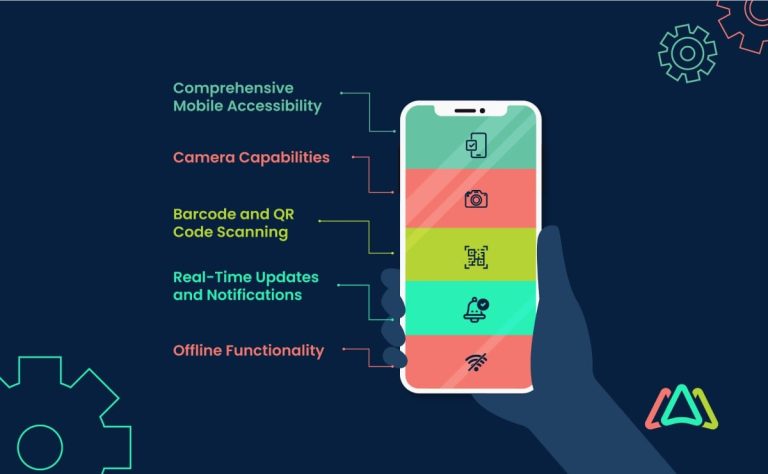
The asset field is the most important one on the form. If the request points at the wrong conveyor or the wrong pump, everything downstream goes to the wrong technician with the wrong parts. Good systems let crews scan an asset tag or QR code, then confirm the asset name and tag number on screen. Searching by location, then narrowing to a parent system, helps when a tag is missing or damaged. Require a confirmed asset ID rather than letting people type a description and move on.
2. Problem Category and Subcategory
Category tells the planner which skill set to send. A leaking seal and a failed variable frequency drive need different people, and a two-level pick-list separates them cleanly. Keep the top level short, perhaps mechanical, electrical, instrumentation, hydraulic, or utilities. The subcategory then narrows it down. Avoid long lists of near-duplicate options, because people will pick whatever sits first and the data becomes useless.
3. Symptom Details Using Structured Prompts
“Not working” is the most common and least helpful symptom description. Structured prompts fix that. Ask what the equipment is doing, what it should be doing, when the problem started, and whether it happens every time or only under load. A prompt like “Is there noise, heat, vibration, smell, leak, or alarm?” lets a crew member answer in seconds. Those answers give a planner enough to decide whether to bring a multimeter, a bearing puller, or a spill kit.
4. Photo Requirements: Angles, Labels, and Serials
A photo of the nameplate is often worth more than a paragraph of notes. Ask for one wide shot showing the equipment in context. Request one close shot of any visible damage and one of the data plate with the model and serial number legible. Blurry or dark images cause callbacks, so some apps check brightness or prompt a retake. Photos are also useful evidence later when a failure keeps recurring and someone needs to compare conditions.
5. Location Precision: Site, Zone, and Room
Plants are large and the same pump model may appear in six buildings. Location should be a chain: site, building, zone or area, and room or bay if relevant. Many crews can add a GPS point or a floor-plan pin, but GPS indoors is unreliable, so a manual pick-list still matters. Ask for a landmark when the layout is confusing. “Behind the blue mixer, east wall” saves a surprising amount of searching.
6. Urgency and Safety Indicators
Urgency should describe impact, not just how the requester feels. A simple set of checks works well. These include whether there is an immediate hazard, whether the equipment is still running, whether production is stopped, and whether there is a regulatory or environmental concern. Lockout status belongs here too. For safety-critical items, the form should route the request to a supervisor automatically rather than waiting in a general queue. The U.S. Occupational Safety and Health Administration publishes guidance on hazardous energy control, which is worth reviewing when you set those lockout prompts (OSHA hazardous energy control guidance).
7. Access Constraints and Downtime Impact
A technician who arrives at a locked enclosure with no permit wastes a trip. Ask whether a permit is needed, whether the area requires confined-space entry, and whether access depends on another team. Downtime impact matters just as much. Record whether the asset is a bottleneck, whether a backup exists, and whether the repair can wait until a planned shutdown. That context helps planners decide between a quick patch and a scheduled fix.
8. Prior Work References and Last Service Notes
Many repeat failures are invisible unless the intake links back to previous work. Pull up the last work order on that asset, and show the last service date, the parts replaced, and any open recommendations. A crew member who sees “bearing replaced six weeks ago” may write a very different symptom description. Linking to history also helps the reader tell a new fault from a returning one, which often points to root cause rather than a quick reset.
9. Customer and Operational Observations with Impact Window
Operators often notice things that the equipment itself does not report. Give the requester a place to note what production saw: product quality changes, cycle time drift, unusual sounds during a particular shift. Pair that with an impact window, meaning when the problem appears and how long a fix can wait before it causes damage or a missed shipment. An impact window turns a vague complaint into a deadline a planner can plan around.
10. Confirmation Fields to Prevent Duplicates and Incomplete Requests
The last item is a short confirmation step. Before submitting, the app should show a summary and check for open requests on the same asset with similar symptoms. If one exists, the system should ask whether to add to it rather than create a second ticket. Also confirm that required fields are complete. Duplicate tickets waste planner time and can send two technicians to one pump. A quick confirmation screen is cheap insurance against that.
Where Intake Design Commonly Goes Wrong
In most systems the failures are not dramatic. They are small gaps that add up. Forms ask for too many fields, so people skip them or fill them with junk. Required fields are missing for safety indicators, so urgent items look routine. Asset lists are never cleaned up, so the same pump appears under four names. Crews stop trusting the maintenance request app and go back to phone calls and paper tags.
The fix is usually to test the form with the people who submit requests. Watch a technician fill out a request on a phone in a noisy area. Notice where they hesitate, where they pick the wrong option, and where they give up and type “see photo.” Those moments show where a field should be a pick-list, a prompt, or a default.
Connected platforms such as Vardian take a similar view. They link intake data with asset records, workflows, and machine signals so that a request arrives already tied to the right equipment. Even without such a platform, the same principle applies: a request should carry enough context that the planner never has to guess.
Turning the Checklist Into Better Requests
Not every item on this list will fit every operation, and some fields will feel like friction until crews see the payoff. Start with the four that most affect routing: asset, category, symptom structure, and location. Those four alone remove a large share of callbacks. Add safety, access, and history fields once the basics are stable. Keep the form short enough that people will finish it on a bad day, because a complete request filed late beats a perfect one never filed.
Measure what changes. Track how many requests come back for missing information, how often duplicates are merged, and how long triage takes before and after changes. Those numbers will tell you more than any checklist can. Revisit the maintenance request app every few months, since new equipment and new crews surface gaps the original design missed.
Frequently Asked Questions
How many fields should a maintenance request app ask for?
There is no fixed number, but most crews do better with a short required core and optional detail. Asset, category, a structured symptom, location, and a safety flag are usually enough to route most jobs. Everything else can be optional or pulled automatically from asset history. If a form takes more than a minute or two on a phone, people will start skipping fields or writing vague text to get through it.
Should crews be required to attach a photo?
Requiring a photo for every request can slow down small jobs, so many teams require one only for certain categories or when the asset is safety-critical. A nameplate photo is especially useful because it confirms the asset and serial number at once. Make the photo step easy to skip for minor items, but make it clear when one is expected. Good photos reduce callbacks more than long written descriptions do.
What is the difference between a CMMS mobile app and an intake form?
An intake form is the part where a request is created. A CMMS mobile app usually covers that plus work order management, scheduling, parts, and history. The intake function is often one module inside a larger system. When evaluating options, check whether the intake form can be customized, whether it links to asset records, and whether it works offline in areas with weak signal.
How do we stop duplicate requests?
Duplicates usually come from people who do not know a request already exists. The most effective fix is a check at submission that searches open requests for the same asset and similar symptoms. It then offers to add the new information to the existing ticket. Showing the requester the open work order before they submit tends to work better than a warning after the fact.
Who should own the intake form design?
In most organizations, maintenance planning or a reliability lead owns the fields, with input from supervisors and frontline crews. Planners know what they need to route jobs, and crews know what is practical to capture. Reviewing a sample of real requests every quarter helps keep the form honest and aligned with how work actually happens.
About This Guide
This guide focuses on the practical data a field team should capture when it submits a maintenance request. It draws on common planning and triage practice rather than a single study or deployment. It is meant as a checklist to adapt to your own equipment and crews.
Further Reading
- CMMS on Android for field crews: when mobile maintenance fails and what to fix
- Application maintenance service comparison: internal team, vendor, and third party support
- Maximo maintenance program build checklist for reliable work order execution
- The preventive maintenance app requirements checklist that prevents missing service history
- CMMS mobile apps for fleet maintenance records: what your field crew must be able to do