Free App Vs Cmms Software Free Trial: What to Expect Before Commit
Limits of free CMMS downloads

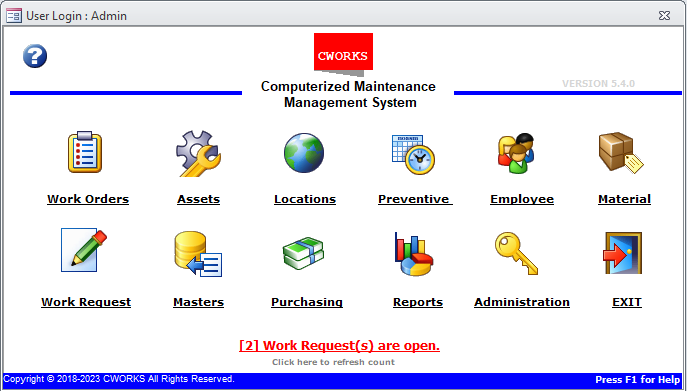
Many operations teams start their search by looking for cmms software free or a free cmms app. They want to see how digital tools might replace paper work orders and spreadsheets. The appeal is obvious when budgets are tight. Maintenance backlogs keep growing. This is especially true for small facilities. They cannot justify enterprise licensing fees right away. Yet most people quickly discover that cmms software free download options come with hard limits. These limits cover assets, users, or preventive maintenance schedules. They only appear after real data is loaded. Examples include sudden caps. These caps force you to archive older work orders. They also restrict the number of simultaneous logins during shift changes.
Confusion grows because some vendors label a short trial as free. Others offer a permanently limited version. It looks generous at first glance. Yet it reveals its boundaries during busy periods. Both approaches can leave teams unsure about data ownership. They also wonder whether the system will still work once production demands increase. One example occurs when a plant adds new equipment mid-year. It suddenly needs to track additional failure modes. This article walks through a practical test process. You can judge what cmms software free actually delivers before any commitment. This helps you avoid the frustration of rebuilding records later.
A computerized maintenance management system, often called CMMS, tracks assets. It schedules work. It also stores repair history in one place. Wikipedia offers a clear overview of the core functions most platforms share. Real-world use often reveals nuances. These include how well the system handles custom asset hierarchies. They also cover how it integrates with existing barcode scanners already in your shop.
How to Do It

The only reliable way to judge cmms software free is to run your own checks. These checks target the exact limits that matter for your site. Follow these nine steps in order. Document what breaks or feels slow at each stage. Note any unexpected behaviors. They could affect daily operations once the team relies on the tool full time. The follow-up piece Web based preventive maintenance software vs Maximo-ready or… covers this in more practical detail. For the adjacent problem, CMMS teams ignore equipment maintenance app expectations goes deeper into the specifics.
- Confirm scope by listing your total asset count. List your average monthly work orders. Also list how many preventive maintenance tasks run each quarter. Most free cmms app versions cap assets at a few dozen. They limit active work orders to a handful per week. This might work for a single production line. It quickly becomes restrictive in multi-shift environments. Write down your actual numbers first. You know immediately when the free tier will force you to delete records or skip tasks. This single step prevents the common surprise of loading fifty machines. It stops you from hitting a wall at twenty-five. You save hours of cleanup work later.
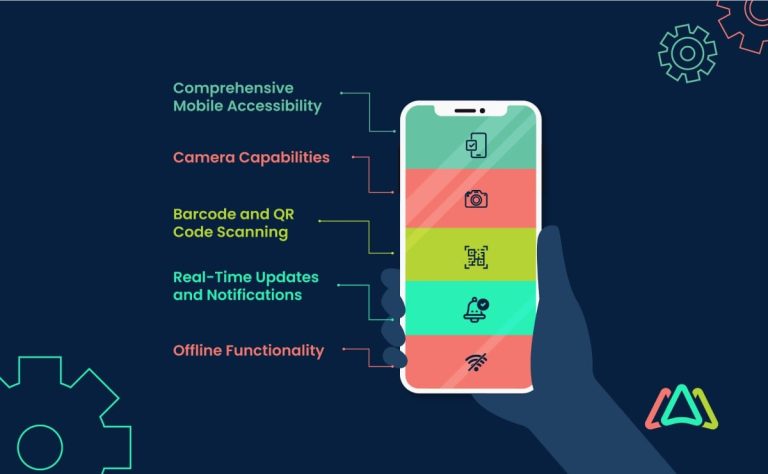
- Validate mobile workflow by creating a work order on a phone. Assign it to a technician. Complete the job with photos and notes. A true mobile cmms must let someone scan a barcode. They add parts used. They close the ticket without returning to a desk. This is essential for technicians working in large warehouses or outdoor yards. Test this on both Android and iOS devices. Some free cmms app builds drop features on one platform. Note how long it takes to sync once the phone reconnects to Wi-Fi. Consider testing during peak network hours to simulate real conditions.
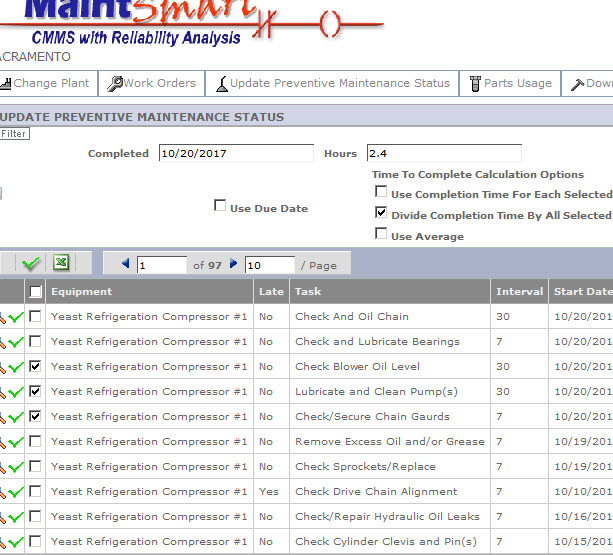
- Test web based access by logging in from a laptop browser. Approve a work order. View full asset history. Export a simple compliance report. Many free tiers hide reporting. They limit the number of users who can view dashboards at the same time. This creates bottlenecks when supervisors need quick overviews before morning meetings. Check whether the interface loads quickly on older computers. These computers are still common in maintenance offices. If basic approvals require extra clicks or page refreshes, that friction will multiply across dozens of daily tasks. It frustrates users who expect fluid navigation.
- Check offline behavior by starting a work order in the field. Then turn on airplane mode to finish it. Field technicians often lose signal inside tanks, basements, or remote buildings. The app must handle these gaps gracefully without losing entered data. A capable mobile cmms should store the completed form. It syncs automatically once coverage returns. Record any data loss or extra steps needed to recover the record after reconnection. These issues can erode trust in the system during critical repairs.
- Review data ownership and export paths by generating a full backup. Include asset history, open PM schedules, and completed work logs. Some cmms software free versions allow exports only in proprietary formats. They block bulk downloads entirely. This becomes problematic if you decide to switch platforms after several months of use. Confirm you can move that data into another system later. Do this without paying a surprise fee. Test the export on a sample of twenty assets. See how complete the files actually are. Check whether custom fields and attached photos transfer properly.
- Assess integrations by attempting to connect the free account to your existing inventory list or ERP alerts. Most free cmms app offerings disable API access. They cap the number of automated notifications. This forces teams to rely on manual updates. Those updates defeat the purpose of going digital. Try sending a simple alert when a work order is overdue. Note whether it arrives. If even basic email triggers are missing, plan extra manual follow-up time once you go live. Consider how this affects response times for urgent issues.
- Confirm role-based access by creating one technician account and one planner account. Check what each can see and edit. Free tiers sometimes force every user into a single permission level. This exposes cost data. It allows technicians to change schedules they should only view. Such issues can lead to compliance problems in regulated industries. Walk through a realistic approval chain. Verify that planners can release work without giving technicians unnecessary rights. Test what happens when a user tries to access restricted reports.
- Evaluate reporting depth by building a downtime summary. Build a list of recurring issues on one asset. Build a PM compliance percentage for the last thirty days. Limited free cmms software free versions often provide only raw lists instead of charts or trend views. This makes it harder to spot patterns. Those patterns could prevent future breakdowns. Export each report and open it in a spreadsheet. See whether the data arrives clean enough for leadership review. Missing fields here usually mean extra manual work later. One example is reformatting data for monthly presentations.
- Run a two-week pilot using your real asset list and the current preventive maintenance schedule. Compare the outputs against what you track today. Load at least ten assets. Create their PMs. Close a handful of corrective work orders while tracking any usability hiccups that arise. Track the time spent entering data versus the time saved finding information. Involve a couple of end users in debrief sessions to gather honest feedback. At the end of the pilot you will know exactly which gaps require a paid upgrade or a different platform. This gives you concrete data for budget discussions.
Tips for a focused CMMS pilot
Start with one asset class
Pick pumps or conveyors first instead of loading every machine on site. This keeps the pilot focused. It reveals whether the free cmms app handles your most common failure modes without extra fields or custom logic. You refine processes before expanding to more complex equipment like CNC machines or HVAC systems.
Define one standard work order template
Build a single template that includes safety steps, parts, and sign-off. Using the same form across the pilot makes it easy to spot missing required fields. Those fields would slow technicians once volume increases. It also helps standardize training. New hires can follow the process without confusion.
Involve one technician early
Ask a field user to complete the mobile steps on day two. Their feedback on button size, photo upload speed, and offline behavior usually highlights problems. Office testing misses those problems entirely. Examples include glare issues on outdoor screens or difficulty attaching multiple images during a single job.
Document every workaround
Keep a running list of extra clicks or missing features you accept during the test. These notes become the requirement list you hand to vendors when you move to a paid cmms software free trial or full deployment. They help you negotiate better terms based on real pain points observed in your environment.
Common Mistakes
- ❌ Judging a cmms app only by how clean the home screen looks. ✅ Running the nine-step pilot with real work orders instead shows whether daily tasks actually finish faster. It often uncovers hidden limitations like slow search functions. Those only appear after hundreds of records are entered.
- ❌ Downloading cmms software free without first listing your asset count and monthly work order volume. ✅ Writing those numbers down before signup prevents the shock of hitting limits on the first day of testing. This can otherwise derail the entire evaluation process. It wastes valuable team time.
- ❌ Ignoring export needs until the pilot ends. ✅ Checking data ownership and file formats in step five ensures you can leave the free version without losing history. This is a critical safeguard when planning for future growth or potential vendor changes.
- ❌ Testing only from the office network. ✅ Verifying mobile cmms performance in actual field locations catches offline and sync problems. Those never appear on a desk computer. Examples include signal drops near heavy machinery or in underground areas. They require immediate attention during the pilot.
Cmms Software Free: Final Thoughts
Treat any cmms software free option as a short evaluation tool. Do not treat it as a permanent replacement for your current process. The nine steps above give you clear evidence. They show where the free version meets your needs. They also show where it falls short on scale, integrations, or reporting. You make an informed decision without rushing into a long-term contract. Once the pilot finishes, prepare a short list of must-have capabilities. Request full demos only from platforms that clear those requirements. Focus on features that directly address the gaps you documented. Many teams find that moving from a limited free cmms app to a connected operations system like Vardian removes the remaining gaps in asset visibility and frontline workflows. This ultimately improves response times. It reduces unplanned downtime across the facility.
Related Topics
- What should a salesforce maintenance schedule cover for recurring jobs and handoffs?
- Mining, food processing, and school maintenance: choosing a maintenance system by constraints
- Verisae maintenance app vs Oracle Fusion maintenance cloud: what breaks first in real plants?
- Set up a maintain application workflow using paper based maintenance without losing control
- Which maintenance application fits your reliability workflow: web based, CMMS, or schedule-only?