IBM Maximo predictive maintenance rollout plan when sensor data is messy
Challenges with sensor data in predictive maintenance initiatives

Many industrial teams launch predictive efforts. They soon discover that sensor feeds arrive incomplete. Asset tags drift across systems. Escalation paths into maintenance execution remain undefined. These gaps stall projects before any value appears. IBM Maximo serves as the layer where alerts must convert into scheduled work. Yet that conversion only works when every upstream assumption receives explicit validation.
Maximo predictive maintenance therefore depends on disciplined mapping and threshold rules. It does not depend on raw data volume alone. Teams often spend months collecting vibration data. They only realize that a significant portion of tags reference retired equipment numbers. This forces a complete restart of the integration effort. Teams often underestimate how legacy historian systems store data. The data sits in proprietary formats that clash with Maximo’s asset registry. This leads to silent failures during alert routing.
Practical tip: conduct a two-week data shadow audit. Compare every incoming sensor stream against the live Maximo asset list. Do this before writing any integration scripts.
The rollout of maximo predictive maintenance succeeds when teams first map assets. They must set clear thresholds. They must integrate alerts directly into work order flows. They should not treat alerts as separate notifications. Adding a dedicated data steward role early in the project helps surface mapping conflicts. This happens before they reach the maintenance planners. Weekly tag reconciliation meetings commonly reduce duplicate asset records within the first quarter. Remember that sensor drift does not only affect accuracy. It also erodes planner trust when false alerts repeatedly appear on their dashboards.
Building a reliable maximo predictive maintenance program despite incomplete data
Define predictive maintenance objectives by risk and failure consequence
Start by listing every asset class. Score each failure mode on safety impact, production loss, and repair cost. High-consequence items receive tighter monitoring. Lower-risk assets tolerate wider signal gaps. This ranking prevents teams from chasing every noisy reading when rolling out maximo predictive maintenance. In IBM Maximo maintenance management software, verify that consequence scores appear as attributes on asset records. Work priority matrices must reference those scores directly.
Confirm that failure codes align with the same risk tiers. Later reports can filter by consequence rather than sensor count. Review the asset hierarchy to ensure parent-child relationships preserve the original risk logic. Update the ranking quarterly as production schedules change.
Scoring assets like ammonia compressors as critical creates an issue. Even brief downtime could trigger regulatory shutdowns. Those assets carry an extra Maximo attribute. It automatically elevates any predictive alert to priority one. Consider adding a simple consequence calculator spreadsheet during the initial workshop. Cross-functional teams can agree on scores without lengthy debates. Revisit the scoring whenever a new product line or safety regulation appears.
Create an asset identity and tagging mapping rule set
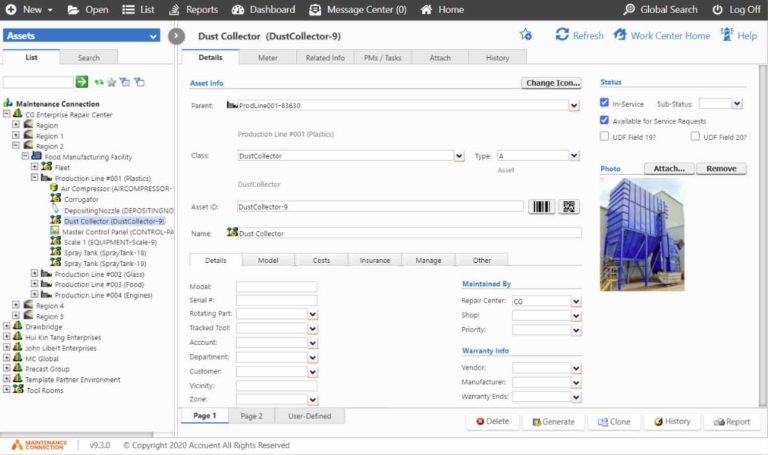
Establish one master naming convention. It reconciles sensor tags, historian points, and Maximo asset numbers before any alert arrives. Rules should cover abbreviations, location suffixes, and serial number formats. Apply the same rule set to both new installations and legacy equipment. In IBM Maximo maintenance management software, check that every asset record contains a dedicated field for the external sensor identifier. Duplicate detection rules must flag mismatches during import.
Test the mapping on a sample batch of 50 assets. Confirm that work orders generated from predictive signals reference the correct record. Document the rule set in a controlled Maximo document library. Field teams cannot create ad-hoc variants. One effective tip is to embed the mapping rules directly into the ETL job as validation scripts. They reject any incoming tag failing the naming standard.
This approach commonly catches historian points that use outdated location codes. They never reach the condition monitoring module. Maintain a change log for every rule update. Auditors can trace why a particular tag was reassigned six months later.
Data readiness and quality checks
Separate signals into three buckets. They are reliable, repairable, and tolerable. Reliable signals meet completeness thresholds. They can drive immediate alerts. Repairable signals require historian fixes or sensor recalibration before use. Tolerable signals stay in dashboards only for trend review. In IBM Maximo maintenance management software, configure data quality rules inside the integration framework. Incomplete records automatically route to a holding queue instead of creating work orders.
Run weekly completeness reports. They compare expected versus received readings per asset class. Retain the original raw values alongside cleaned versions to support later audits. Focus first on the repairable bucket. Those fixes unlock the largest number of usable signals without new hardware spend. Teams often recover more value when they treat this step as core to maximo predictive maintenance.
Translate signals into actionable thresholds and confidence bands
Convert raw sensor values into maintenance triggers. Define both an action limit and a confidence band around it. The band accounts for normal variation and missing data periods. When a reading crosses the limit inside the band, the system creates a draft work order. It requires planner review.
In IBM Maximo maintenance management software, confirm that threshold definitions live in the condition monitoring module. Each threshold links to a specific failure code and job plan. Test the band width on historical data. False positives stay below ten percent. Adjust the band seasonally if temperature or load patterns shift the baseline. Keep the threshold logic version-controlled. Changes can be traced back to the original risk ranking.
Consider running a sensitivity analysis. Use three months of archived data. Visualize how different band widths affect alert volume. This exercise often reveals that a slightly wider band cuts false positives by half. It only delays genuine alerts by a few hours. Document the rationale for each threshold setting inside the Maximo condition record. Future reliability engineers understand the original design intent. The same discipline applies when expanding maximo predictive maintenance across additional sites.
Operationalize into maintenance management workflows
Route every validated alert into an existing preventive or corrective work order template. Do not use a standalone ticket type. This keeps planners inside familiar screens. It preserves labor and material estimates. Add a predictive source field. Later analysis can separate model-driven work from time-based tasks. In IBM Maximo maintenance management software, verify that the workflow engine assigns the correct supervisor and craft. Base this on the asset location and failure code.
Confirm that the work order description pulls the sensor reading and threshold value automatically. The approach described at Vardian maximo predictive maintenance covers this step in more depth. It shows how alerts flow into existing schedules without creating duplicate entries. Measure the time from alert generation to work order release during the first month of operation.
Adding a simple alert aging report helps. It highlights any predictive work order sitting in draft status longer than 48 hours. This often reduces average release time within the pilot period.
Pilot, measure, and iterate
Run the first pilot on ten high-risk assets for ninety days. Track three metrics. They are work order closure quality, false positive rate, and mean time from alert to completion. Capture planner notes on every closed order. Identify threshold drift or mapping errors. In IBM Maximo maintenance management software, build a simple KPI report. It joins predictive alerts to closure codes and labor hours. Review the report weekly with reliability and maintenance leads.
Adjust one threshold or mapping rule at a time. The effect remains visible. Expand the pilot only after the false positive rate drops below eight percent. Closure quality scores must exceed ninety percent. Document every change in the Maximo change management module.
During the pilot, schedule a short daily stand-up. It occurs between the data analyst and the lead planner. Emerging issues surface before they compound. This ritual commonly surfaces recurring tag mismatches early. It avoids issues during the 90-day review. Many organizations now embed these reviews directly into their maximo predictive maintenance cadence.
Real-world scenarios that test the rollout plan
Rotating equipment with intermittent vibration data
Vibration sensors on motors often drop readings during network outages. The rollout plan tolerates gaps up to four hours. It extends the confidence band rather than disabling the alert. Asset mapping rules force the historian tag to match the Maximo motor record before any threshold applies. During the pilot, planners reviewed draft work orders. They referenced the exact gap duration. They could decide whether to inspect immediately or wait for the next complete data window. A packaging line motor shows a four-hour gap. It coincides with a known network switch replacement. The team skips an unnecessary inspection. They instead schedule a sensor firmware update during the next planned outage.
Pumps with sporadic runtime hour accumulation
Some pumps log runtime only when the control system communicates. The plan treats missing hours as zero contribution to cumulative stress. It widens the vibration threshold accordingly. In IBM Maximo maintenance management software, the job plan includes an extra step. Verify actual runtime from the local panel before closing the order. This single addition often reduces unnecessary bearing replacements by a significant amount in the first pilot month. A practical tip is to add a quick reference note in the work order instructions. It tells technicians exactly where to find the local runtime counter. This eliminates guesswork when the historian feed is incomplete.
Conveyors carrying inconsistent asset identifiers
Older conveyors appear under multiple tag formats across the historian and CMMS. The mapping rule set created a canonical identifier. Both systems now reference it. Predictive alerts for belt misalignment therefore land on the correct work order template. Tracking every alert-to-order handoff commonly reveals that a portion of signals still point to retired asset numbers. This prompts a final cleanup pass before full rollout. After the cleanup, teams often discover additional retired conveyors. They had never been removed from the historian. This prevents future false alerts from those sources as well.
Reducing rollout risk through disciplined integration
Successful maximo predictive maintenance programs reduce risk. They lock asset mapping rules early. They govern thresholds against actual failure data. They route every alert into existing work management screens. These steps keep planners inside familiar processes. They still capture the benefit of sensor signals. Organizations ready to move from pilot to production should request a Maximo maintenance software demo. It demonstrates the full path from raw sensor reading through threshold evaluation and into scheduled work execution. Adding a post-pilot retrospective with all stakeholders helps. This includes the controls and IT teams. It often surfaces integration bottlenecks that were invisible during the initial ninety-day window. Organizations often use this retrospective to create a living playbook. It serves as the onboarding document for every new reliability engineer joining the predictive program.
Further Reading
- Maximo maintenance program build checklist for reliable work order execution
- Maintenance management for mining operations: choosing a software fit for harsh environments
- CMMS on Android for field crews: when mobile maintenance fails and what to fix
- Maintenance Request System Checklist for Mobile Field Crews: What to Capture at Intake
- What to require in a maintenance job application workflow for mobile field teams